👉🏻 Vite + 리액트 설치 및 실행(MacOS)
Installing and Running Vite + React (MacOS)
✔️ Vite+React에서 Vite란 프랑스어로 빠르다라는 뜻입니다.
In Vite+React, Vite means fast in French.
✔️ 개발 환경을 구축하고 코드를 실행하는 속도를 획기적으로 개선하는 것을 목표로 만들어졌습니다.
It was created with the goal of dramatically improving the speed at which you can set up your development environment and run your code.
✔️ Vite+리액트란? UI 라이브러리 (컴포넌트 만들기)빌드 도구[react] + 개발 서버[vite]
What is Vite+React? A UI library (for building components) and a build tool (React) + a development server (Vite).
✔️ 보통 nginx가 React를 서빙하고 nodejs express랑 연동을 합니다.
Usually nginx serves React and connects with nodejs express.
# 1. 최신 Vite + React + TypeScript 프로젝트 생성
# Create a modern Vite + React + TypeScript project
npm create vite@latest myvideo-admin --template react-ts

# 만약 yarn 쓰는 경우
# If you use yarn
# yarn create vite myvideo-admin --template react-ts

# 2. 프로젝트 폴더로 이동
#Go to project folder
cd myvideo-admin

# 3. 의존성 설치
# Installing dependencies
npm install

# 4. 개발 서버 실행 (자동으로 브라우저 열림)
# Run the development server (browser opens automatically)
npm run dev
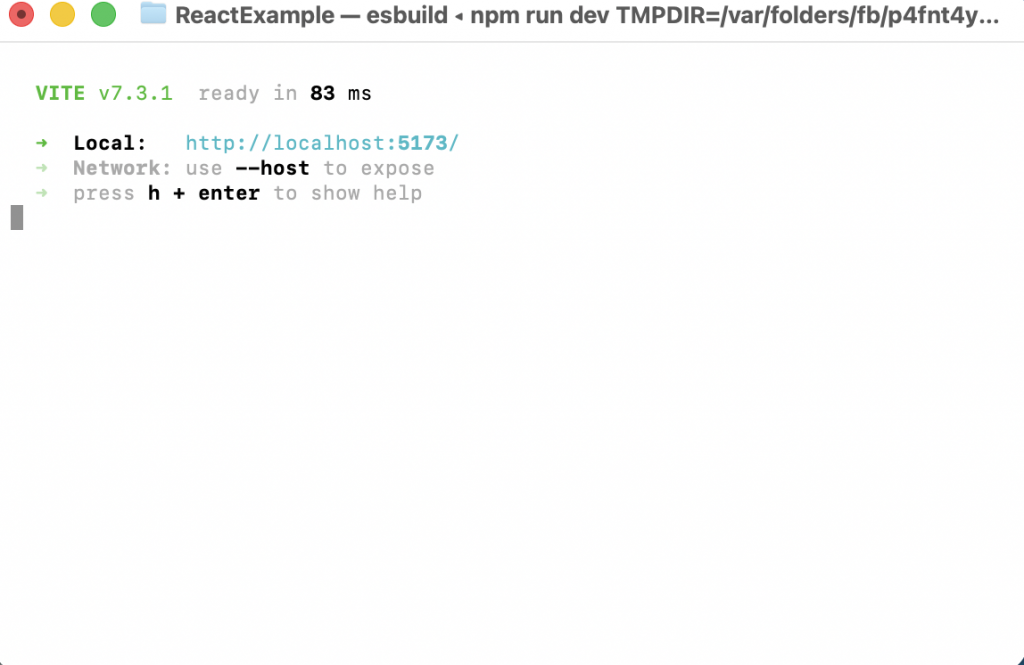
✔️ 스크린샷/ScreenShot

👉🏻postgresql 설치(MacOS) / Start,Stop the PostgreSQL Service (MacOS)
✔️ 설치 / install
brew install postgresql@17 ✔️ 환경변수설정 및 실행 / Setting environment variables and running
# Homebrew postgresql@17의 bin 경로 추가 (Apple Silicon Mac 기준)
# Added bin path for Homebrew postgresql@17 (based on Apple Silicon Macs)
echo 'export PATH="/opt/homebrew/opt/postgresql@17/bin:$PATH"' >> ~/.zshrc

# Intel Mac이면 /usr/local/opt/... 일 수 있음 → 아래로 대체
# If you have an Intel Mac, it may be /usr/local/opt/... → Replace with below
# echo 'export PATH="/usr/local/opt/postgresql@17/bin:$PATH"' >> ~/.zshrc

# 변경 적용 (터미널 재시작 없이 바로)
# Apply changes (immediately without restarting the terminal)
source ~/.zshrc

# 다시 확인
# check again
psql --version

# 실행 ,Mac에서는이렇게 실행하면 됨 수퍼유저가 postgres가 아님.
# Run , on Mac, run like this. The superuser is not postgres.
psql postgres
✔️ postgresql 서비스 시작 종료(MacOS)
Start,Stop the PostgreSQL Service (MacOS)
brew services start postgresql@17 # start
brew services stop postgresql@17 # stop
✔️ 데이터베이스 접속 / Database connection
psql postgres