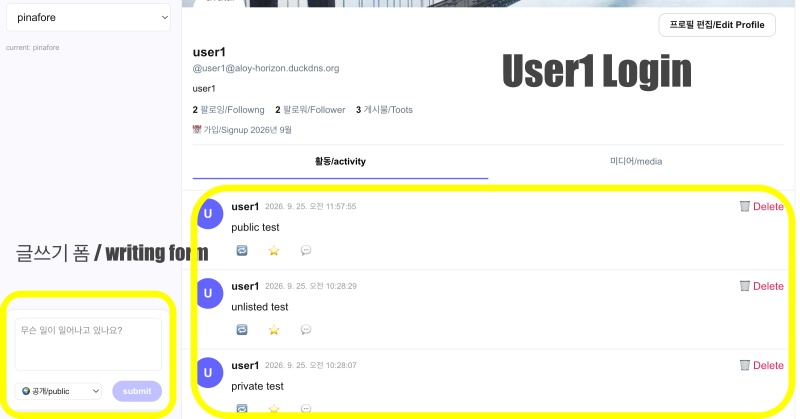
👉🏻 myapp48에서는 로컬 SNS페이지에서 글쓰기 폼을 추가합니다.
In myapp48, a post creation form is added to the local social media page.
👉🏻 작성한 글이 public / unlisted / private로 구분해서 저장되도록 데이터베이스 테이블을 수정합니다.
Modify the database table so that written posts are saved with a classification of public, unlisted, or private.
👉🏻 전체 코드는 깃허브에서 확인 할 수 있습니다.
You can find the full code on GitHub.
https://github.com/gideonslife01/flm-nextjs
📁 전체 프로젝트 구조 / Overall Project Structure
myapp project/
├── app/  (Next.js App Router)
│   ├── .well-known/webfinger/route.ts  -> webfinger
│   ├── api/follow/route.ts    -> Follow API(temporary)
│   ├── api/announce/route.ts  -> Boost(Announcement)
│   ├── api/like/route.ts.     -> Like API
│   ├── api/posts/route.ts     -> Writing API
│   ├── api/timeline/route.ts  -> Timeline API
│   ├── api/followinglist/route.ts  -> followinglist API
│   ├── api/followerslist/route.ts  -> followerslist API
│   ├── api/v1/instance/route.ts -> auth
│   ├── api/v1/apps/route.ts.    -> auth
│   ├── api/v1/accounts/verify_credentials/route.ts -> auth
│   ├── api/v1/statuses/route.ts -> Write Post
│   ├── api/v1/timelines/home/route.ts -> timeline
│   ├── oauth/authorize/route.ts -> auth
│   ├── oauth/token/route.ts -> auth
│   ├── api/v1/search/home/route.ts -> search
│   ├── api/v2/search/home/route.ts -> search
│   ├── api/v1/accounts/[id]/followers/route.ts -> followers
│   ├── api/v1/accounts/[id]/following/route.ts -> following
│   ├── api/v1/statuses/[id]/route.ts -> -> Post delete(pinafore)
│   ├── api/auth/signup/route.ts        -> Signup
│   ├── api/auth/login/route.ts         -> Login
│   ├── api/auth/logout/route.ts        -> Logout
│   ├── api/auth/refresh/route.ts       -> Refresh Token
│   ├── api/cleanup-orphan/route.ts     -> post,outbox clean up
│   ├── api/auth/me/route.tsx           -> Login Check
│   ├── auth/signup/page.tsx            -> Signup UI
│   ├── auth/signup/page.tsx            -> Login UI
│   ├── users/[username]/
│   │   ├── statuses/[id]/route.ts -> Indivisual Post
│   │   ├── route.ts               -> Acotr Information
│   │   ├── followers/route.ts     -> Followers List
│   │   ├── following/route.ts     -> Following List
│   │   ├── inbox/route.ts         -> Inbox
│   │   └── outbox/route.ts        -> outbox
│   ├── usersui/[username]/
│   │   ├── page.tsx               -> Timeline UI(Server, 404)
│   │   ├── ClientPage.tsx.        -> Timeline UI(Client,Call Active Themes)
│   │   └── _components/themes/
│   │       ├── themeex/ThemeexTheme.tsx   -> Example Theme
│   │       ├── pinafore/PinaforeTheme.tsx -> Theme 1
│   │       ├── pinafore/FollowersList.tsx -> Theme 1, FollowersList
│   │       ├── pinafore/FollowingList.tsx -> Theme 1, FollowingList
│   │       ├── pinafore/NotificationsList.tsx -> Theme 1, NotificationsList
│   │       ├── mastodon/MastodonTheme.tsx -> Theme 2
│   │       └── minimal/MinimaltTheme.tsx  -> Theme 3
│   ├── layout.tsx, page.tsx, globals.css
│   └── favicon.ico
├── lib/
│   ├── theme.tsx              -> Theme Provider
│   ├── watchThemes.ts         -> Check real-time theme changes
│   ├── auth.ts                -> Authentication, User Management
│   ├── ap.ts                  -> Follow,Undo,Create,Likes,Announce
│   ├── visibility.ts          -> Visibility(Public,Unlisted,Private,Direct)
│   └── db.ts                  -> DB connection
├── data/
│   ├── keys/userIDs/          -> private.pem, public.pem(New)
│   └── keys/                  -> private.pem, public.pem(legacy)
├── data.sqlite                -> Database(1/3)
├── data.sqlite-wal            -> Database(2/3)
├── data.sqlite-shm            -> Database(3/3)
├── Caddyfile                  -> https
├── instrumentation.ts         -> Background Server
└── package.json
📁 프로젝트 시작 / Project Start
📁 visibility
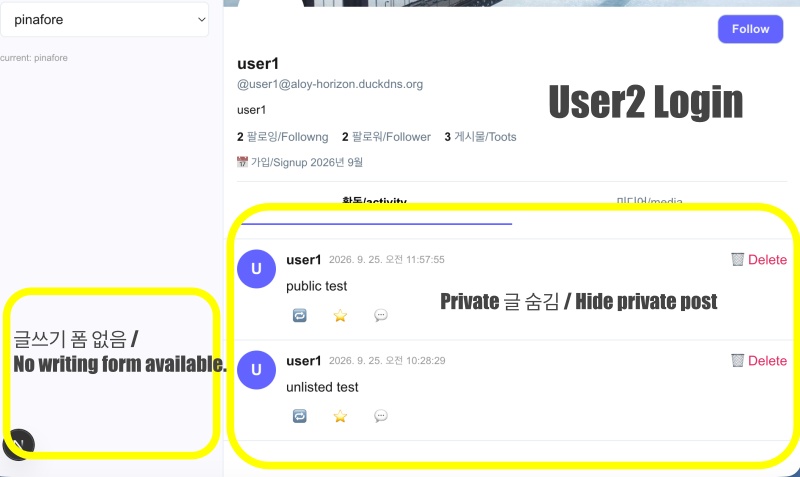
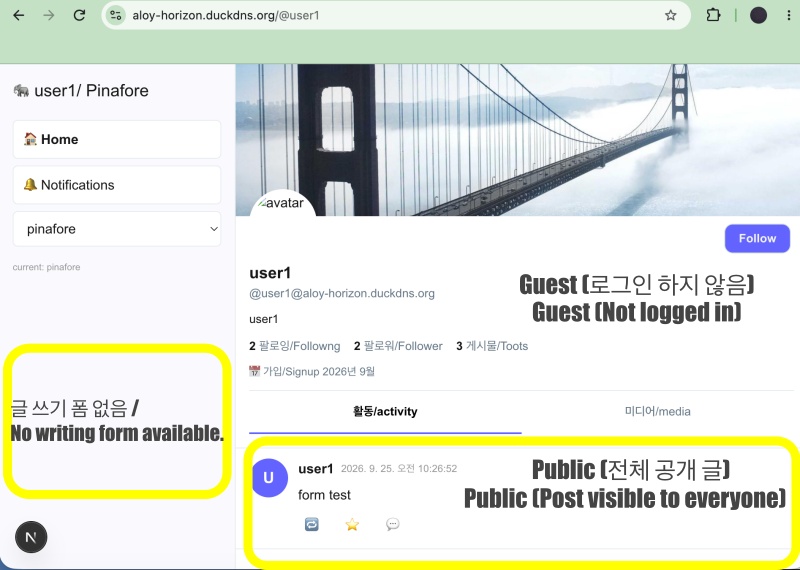
| 글 상태 / Post Status | 게스트 / guest | 다른 사람으로 로그인 한 경우 | 팔로워 / follower |
|---|---|---|---|
| public | O | O | O |
| unlisted | X (프로필/profile) | O (프로필/profile) | O (홈 설정에 따라서 Depending on the home settings) |
| private | X | X | O (본인+팔로워 / Me + Followers) |
📁 데이터베이스 테이블 수정
Modify database table
— 아래의 SQL문을 Sqlite에서 한줄씩 실행합니다.
Execute the SQL statements below in SQLite one line at a time.
-- 1. posts에 visibility + 필요한 컬럼 추가
Add visibility and necessary columns to the `posts` table.

ALTER TABLE posts ADD COLUMN visibility TEXT DEFAULT 'public' CHECK(visibility IN ('public','unlisted','private','direct'));
ALTER TABLE posts ADD COLUMN original_id TEXT;
ALTER TABLE posts ADD COLUMN sensitive INTEGER DEFAULT 0;

-- 2. inbox_posts에 visibility + type + sensitive 추가 (리모트 글 구분)
Added `visibility`, `type`, and `sensitive` to `inbox_posts` (to distinguish remote posts).

ALTER TABLE inbox_posts ADD COLUMN visibility TEXT DEFAULT 'public' CHECK(visibility IN ('public','unlisted','private','direct'));
ALTER TABLE inbox_posts ADD COLUMN type TEXT DEFAULT 'Note';
ALTER TABLE inbox_posts ADD COLUMN sensitive INTEGER DEFAULT 0;

-- 3. outbox에도 visibility 추가 (배달할때 to/cc 구분용)
Added visibility to the outbox as well (to distinguish between 'To' and 'CC' during delivery).

ALTER TABLE outbox ADD COLUMN visibility TEXT DEFAULT 'public';

-- 4. 인덱스 보강 (타임라인 속도)
Index Reinforcement (Timeline Speed)

CREATE INDEX IF NOT EXISTS idx_posts_visibility ON posts(visibility);
CREATE INDEX IF NOT EXISTS idx_inbox_visibility ON inbox_posts(visibility);
CREATE INDEX IF NOT EXISTS idx_outbox_visibility ON outbox(visibility);

-- 확인/Check
.schema posts
.schema inbox_posts
.schema outbox
— 변경된 스키마 / Modified schema
sqlite> .schema posts
CREATE TABLE posts (
    id TEXT PRIMARY KEY,
    content TEXT NOT NULL,
    created_at DATETIME DEFAULT CURRENT_TIMESTAMP
  , username TEXT DEFAULT 'user1', visibility TEXT DEFAULT 'public' CHECK(visibility IN ('public','unlisted','private','direct')), original_id TEXT, sensitive INTEGER DEFAULT 0);
CREATE INDEX idx_posts_username_created ON posts(username, created_at DESC);
CREATE INDEX idx_posts_visibility ON posts(visibility);

sqlite> .schema inbox_posts
CREATE TABLE inbox_posts (
  id TEXT PRIMARY KEY,
  actor TEXT,
  content TEXT,
  username TEXT,
  created_at DATETIME DEFAULT CURRENT_TIMESTAMP
, original_id TEXT, visibility TEXT DEFAULT 'public' CHECK(visibility IN ('public','unlisted','private','direct')), type TEXT DEFAULT 'Note', sensitive INTEGER DEFAULT 0);
CREATE INDEX idx_inbox_username_created ON inbox_posts(username, created_at DESC);
CREATE INDEX idx_inbox_actor ON inbox_posts(actor);
CREATE INDEX idx_inbox_visibility ON inbox_posts(visibility);

sqlite> .schema outbox
CREATE TABLE outbox (
          id TEXT PRIMARY KEY,
          type TEXT,
          actor TEXT,
          object TEXT,
          created_at INTEGER
        , visibility TEXT DEFAULT 'public');
CREATE INDEX idx_outbox_visibility ON outbox(visibility);
📁 파일 추가 / Add file – visibility
✔️ lib/visibility.ts
— 쿠키에 있는 값으로 session테이블의 유저를 검색하고 SNS페이지의 글을 public’ | ‘unlisted’ | ‘private’ 별로 필터링 하는 기능입니다.
This feature searches for a user in the session table using a value from a cookie and filters posts on the SNS page based on visibility settings: ‘public’, ‘unlisted’, or ‘private’.
— 자세한 코드내용은 깃허브 코드를 참조 하세요
Please refer to the GitHub repository for detailed code.
export type Visibility = 'public' | 'unlisted' | 'private' | 'direct';

function decodeJwtUsername(jwt: string): string | null { ... }
export function getViewerFromRequest(req: Request): string | null { ... }
export function isFollower(viewer: string, author: string): boolean { ... }
export function canSee(viewer: string | null, post: any): boolean { ... }
📁 코드 수정 / Code Modification – visibility 저장 및 기존 기능 확인
✔️ lib/db.ts
— 변경된 스키마에 맞게 코드를 수정합니다.
Modify the code to match the updated schema.
db.exec(`
... ...

  -- ✅ myapp48 posts - visibility 추가! (public/unlisted/private/direct)
  CREATE TABLE IF NOT EXISTS posts (
    id TEXT PRIMARY KEY,
    content TEXT NOT NULL,
    username TEXT DEFAULT 'user1',
    visibility TEXT DEFAULT 'public' CHECK(visibility IN ('public','unlisted','private','direct')),
    sensitive INTEGER DEFAULT 0,
    original_id TEXT,
    created_at DATETIME DEFAULT CURRENT_TIMESTAMP
  );

... ...

  -- ✅ myapp48 inbox_posts - visibility + type 추가/Added
  CREATE TABLE IF NOT EXISTS inbox_posts (
    id TEXT PRIMARY KEY,
    original_id TEXT,
    actor TEXT,
    content TEXT,
    username TEXT,
    visibility TEXT DEFAULT 'public' CHECK(visibility IN ('public','unlisted','private','direct')),
    type TEXT DEFAULT 'Note',
    sensitive INTEGER DEFAULT 0,
    created_at DATETIME DEFAULT CURRENT_TIMESTAMP
  );

... ...

  -- ✅ myapp46 outbox - visibility 추가/added!
  CREATE TABLE IF NOT EXISTS outbox (
    id TEXT PRIMARY KEY,
    type TEXT,
    actor TEXT,
    object TEXT,
    visibility TEXT DEFAULT 'public',
    created_at INTEGER
  );

... ...
`);

db.exec(`
... ...

  -- posts
  CREATE INDEX IF NOT EXISTS idx_posts_username_created ON posts(username, created_at DESC);
  CREATE INDEX IF NOT EXISTS idx_posts_visibility ON posts(visibility);

  -- inbox_posts
  CREATE INDEX IF NOT EXISTS idx_inbox_username_created ON inbox_posts(username, created_at DESC);
  CREATE INDEX IF NOT EXISTS idx_inbox_actor ON inbox_posts(actor);
  CREATE INDEX IF NOT EXISTS idx_inbox_visibility ON inbox_posts(visibility);

... ...

  -- outbox
  CREATE INDEX IF NOT EXISTS idx_outbox_visibility ON outbox(visibility);
`);
✔️app/api/v1/statuses/route.ts – remote server
— 외부 앱에서 내 서버에 글 작성할때 visibility 필드 적용
Apply the visibility field when posting to my server from an external app.
... ...
export async function POST(req: Request) {
... ...
/*-- 테이블 생성 부분 삭제 / Delete the table creation section. */

    // posts 저장 / save posts
    // ✅ myapp48 - add visibility
    try {
      db.prepare(`INSERT INTO posts (id, content, created_at, username, visibility) VALUES (?,?,?,?,?)`)
        .run(id, content, now, username, visibility);
    } catch (e) {
      console.error('posts 저장 에러 / posts save error', e);
    }

    //✅ myapp48 -  to,cc 구분 / to,CC distinction
    const followersUrl = `https://${DOMAIN}/users/${username}/followers`;
    let to: string[] = [];
    let cc: string[] = [];

    if (visibility === 'public') {
      to = ['https://www.w3.org/ns/activitystreams#Public'];
      cc = [followersUrl];
    } else if (visibility === 'unlisted') {
      to = [followersUrl];
      cc = ['https://www.w3.org/ns/activitystreams#Public'];
    } else if (visibility === 'private') {
      to = [followersUrl];
      cc = [];
    }
    // ✅ myapp48
    const note = {
      id: `https://${DOMAIN}/users/${username}/statuses/${id}`,
      type: 'Note',
      content: `<p>${content}</p>`,
      attributedTo: `https://${DOMAIN}/users/${username}`,
      published: new Date(now).toISOString(),
      to,
      cc,
    };

    /*-- 테이블 생성 부분 삭제 / Delete the table creation section. */
    // outbox 저장
    // ✅ myapp48 - add visibility
    try {
      db.prepare(`INSERT INTO outbox (id, type, actor, object, created_at, visibility) VALUES (?,?,?,?,?,?)`)
        .run(randomUUID(), 'Create', `https://${DOMAIN}/users/${username}`, JSON.stringify(note), now, visibility);
    } catch (e) {
      console.error('outbox 저장 에러', e);
    }
... ...
}
... ...
✔️app/api/posts/route.ts – local server
— 로컬 서버 글쓰기 할 때 visibility 필드 적용
Apply the visibility field when writing on the local server.
... ...
// ✅ myapp48
import { getViewerFromRequest, canSee } from '@/lib/visibility';

export async function GET(req: Request) {
  const { searchParams } = new URL(req.url);
   let targetUsername = searchParams.get('username'); // ✅ myapp48


  // ✅ myapp48 - viewer / target 분리 (기존 코드는 token 있으면 username 덮어써서 프로필 조회가 망가짐)
  // targetUsername = 프로필 주인, viewer = 지금 로그인한 사람
  const viewer = getViewerFromRequest(req); // login user
  const profileOwner = targetUsername; // search user

  // ✅ myapp48 - target 체크
  if (!profileOwner) return NextResponse.json({ error: 'username required' }, { status: 400 });

  const allPosts = db.prepare('SELECT * FROM posts WHERE username =? ORDER BY created_at DESC').all(profileOwner) as any[];

  // ✅ myapp48 - visibility 필터링 추가
  // public: 누구나 / unlisted: 로그인 필요 / private: 본인+팔로워만
  const isOwnerView = viewer && viewer === profileOwner;
  const filtered = allPosts.filter((p: any) => {
    if (isOwnerView) return true; // 본인이면 전부 보기
    return canSee(viewer, p);
  });

  return NextResponse.json(filtered);
}

export async function POST(req: Request) {
... ...
  // ✅ myapp48 - visibility default value
  visibility = visibility || 'public';
... ...
  // ✅ myapp48 - add visibility
  const id = randomUUID();
  const now = Date.now();
  //db.prepare('INSERT INTO posts (id, content, username) VALUES (?, ?, ?)').run(id, content, username);
  db.prepare('INSERT INTO posts (id, content, username, created_at, visibility) VALUES (?,?,?,?,?)').run(id, content, username, now, visibility);

  // ✅ myapp48
  // - to/cc distinction
  const followersUrl = `https://${DOMAIN}/users/${username}/followers`;
  let to: string[] = [];
  let cc: string[] = [];
  if (visibility === 'public') {
    to = ['https://www.w3.org/ns/activitystreams#Public'];
    cc = [followersUrl];
  } else if (visibility === 'unlisted') {
    to = [followersUrl];
    cc = ['https://www.w3.org/ns/activitystreams#Public'];
  } else if (visibility === 'private') {
    to = [followersUrl];
    cc = [];
  }
  // ✅ myapp48
  const noteId = `https://${DOMAIN}/users/${username}/posts/${id}`;
  const note = {
    id: noteId,
    type: 'Note',
    attributedTo: `https://${DOMAIN}/users/${username}`,
    content: content.startsWith('<p>')? content : `<p>${content}</p>`,
    published: new Date().toISOString(),
    to,
    cc
  };

// ✅ myapp48 - add visibility
  try {
    db.prepare('INSERT INTO outbox (id, type, actor, object, created_at, visibility) VALUES (?,?,?,?,?,?)')
     .run(randomUUID(), 'Create', `https://${DOMAIN}/users/${username}`, JSON.stringify(note), now, visibility);
  } catch (e) {
    console.error('outbox 저장 에러', e);
  }
... ...

}
... ...
✔️ app/api/timeline/route.ts – local UI
— 내 서버 UI페이지에서 visibility 적용
Apply visibility on my server UI page.
... ...
// ✅ myapp48
import { getViewerFromRequest, canSee } from '@/lib/visibility';

export async function GET(req: Request) {
... ...
  // ✅ myapp48
  const viewer = getViewerFromRequest(req);
  const isOwnerView = viewer && viewer === username;
... ...
  // ✅ myapp48 - visibility 컬럼 추가 조회 ( visibility 검색)
  const rawTimeline = db.prepare(`
    SELECT id, content, username, username as actor, created_at, visibility, 'mine' as source, id as original_id
    FROM posts WHERE username =?
    UNION ALL
    SELECT id, content, username, actor, created_at, visibility, 'inbox' as source, original_id
    FROM inbox_posts WHERE username =?
    ORDER BY created_at DESC
    LIMIT 80
  `).all(username, username) as any[];

  // ✅ myapp48 - visibility 필터링 로직 추가
  // public: 누구나 / unlisted: 로그인 필요 / private: 본인 + 팔로워만
  const timeline = rawTimeline.filter((p: any) => {
    // 내 타임라인을 내가 보는 경우 -> 전부 보여줌 (private 포함)
    if (isOwnerView) return true;
    // 남의 타임라인을 보거나 게스트인 경우 -> canSee로 필터
    return canSee(viewer, p);
  });

}
✔️ app/api/v1/timelines/home/route.ts – External UI(etc. Pinafore)
— 외부앱에서 내 서버 타임라인 볼때 visibility 적용
Apply visibility settings when viewing my server’s timeline from an external app.
// ✅ myapp48 - visibility 공통 헬퍼 import 추가
import { getViewerFromRequest, canSee } from '@/lib/visibility';
... ...
export async function GET(req: Request) {
... ...
  // ✅ myapp48
  const viewer = getViewerFromRequest(req);
  const username = viewer || 'user1'; // 게스트면 빈 타임라인 반환되도록 아래에서 처리

  // ✅ myapp48 - 비로그인이면 홈 타임라인 접근 차단 (마스토돈 스펙)
  // Access to the home timeline is blocked for non-logged-in users (Mastodon specification).
  if (!viewer) {
    return NextResponse.json([], { headers: { 'Access-Control-Allow-Origin': '*', 'Content-Type': 'application/json' } });
  }
... ...
  // ✅ myapp48 - visibility 필터링 적용
  // 정책: public = 누구나, unlisted = 홈에서는 보여줌 (프로필에서만 숨기려면 false로 변경), private = 본인+팔로워만
  // Policy: public = visible to everyone, unlisted = visible on Home (change to false to hide only from profile), private = visible only to self and followers
  const rawRows = [...myPosts,...inboxPosts];
  const filteredRows = rawRows.filter((p: any) => {
    const vis = p.visibility || 'public';
    if (vis === 'public') return true;
    if (vis === 'unlisted') {
      // 마스토돈 정석은 홈에 unlisted 표시함.
      return true; // <- false로 바꾸면 홈에서 unlisted 숨김
    }
    if (vis === 'private') {
      return canSee(viewer, p);
    }
    return true;
  });
  filteredRows.sort((a,b) => parseDate(b.created_at) - parseDate(a.created_at));
... ...
}
✔️app/users/[username]/inbox/route.ts
— 글 저장시 visibility 필드 추가 / Add a visibility field when saving the post.
... ...
export async function POST(req: Request, { params }: { params: Promise<{ username: string }> }) {
... ...
if (body.type === 'Create') {
... ...
          // ✅ myapp48 - for visibility
          const to = note.to || [];
          const cc = note.cc || [];
          const isPublicInTo = Array.isArray(to)? to.includes('https://www.w3.org/ns/activitystreams#Public') : to === 'https://www.w3.org/ns/activitystreams#Public';
          const isPublicInCc = Array.isArray(cc)? cc.includes('https://www.w3.org/ns/activitystreams#Public') : cc === 'https://www.w3.org/ns/activitystreams#Public';
          let visibility = 'public';
          if (!isPublicInTo &&!isPublicInCc) visibility = 'private';
          else if (!isPublicInTo && isPublicInCc) visibility = 'unlisted';
          else visibility = 'public';

          console.log(` -> visibility: ${visibility} to=${JSON.stringify(to)} cc=${JSON.stringify(cc)}`);


          // db.prepare(`INSERT OR IGNORE INTO inbox_posts (id, actor, content, username, original_id, created_at) VALUES (?,?,?,?,?,?)`)
          //  .run(shortId, actorId, content, username, longId, note.published || new Date().toISOString());

          // ✅ myapp48 - add visibility
          db.prepare(`INSERT OR IGNORE INTO inbox_posts (id, actor, content, username, original_id, created_at, visibility, type) VALUES (?,?,?,?,?,?,?,?)`)
          .run(shortId, actorId, content, username, longId, note.published || new Date().toISOString(), visibility, note.type || 'Note');

... ...
}
... ...
}
✔️ app/usersui/[username]/_components/themes/pinafore/PinaforeTheme.tsx
— 글쓰기 폼 적용 / Apply writing form
... ...
export function PinaforeTheme({ timeline : initialTimeline, username, initialView, onBoost, onLike }: any) {

... ...
  // ✅ myapp48 - writing status
  const [composeText, setComposeText] = useState('');
  const [composeVis, setComposeVis] = useState<'public'|'unlisted'|'private'>('public');
  const [posting, setPosting] = useState(false);
... ...
// ✅ myapp48 : write post
const handlePost = async () => {
  if (!composeText.trim() || posting) return;
  setPosting(true);
  try {
    // 토큰 있으면 헤더에 넣고 없으면 쿠키 인증으로!
    const token = localStorage.getItem('access_token') || localStorage.getItem('token') || '';
    const res = await fetch('/api/v1/statuses', {
      method: 'POST',
      headers: {
        'Content-Type': 'application/json',
         ...(token? { Authorization: `Bearer ${token}` } : {})
      },
      credentials: 'include',
      body: JSON.stringify({ status: composeText, visibility: composeVis })
    });
    if (res.ok) {
      const newPost = await res.json();
      setComposeText('');
      // 타임라인 맨 위에 즉시 추가!
      setTimeline((prev: any[]) => [{
        id: newPost.id, content: newPost.content, actor: `https://${DOMAIN}/users/${username}`,
        username: username, created_at: new Date().toISOString(), source: 'local', isMine: true, visibility: composeVis
      },...prev]);
      setCounts(c => ({...c, posts: c.posts + 1}));
    } else alert('게시 실패');
    } catch (e) { console.error(e); alert('게시 실패'); }
  setPosting(false);
};
... ...
return (
<>
<style>{`
... ...
       /* ✅ myapp48 - composer(write form) */
       .pinafore-composer { margin-top: auto; background: white; border: 1px solid #e6ecf0; border-radius: 12px; padding: 12px; box-shadow: 0 4px 12px rgba(0,0,0,0.05); }
       .pinafore-composer textarea { width: 100%; height: 80px; resize: none; border: 1px solid #e6ecf0; border-radius: 8px; padding: 8px; font-size: 14px; outline: none; }
       .pinafore-composer textarea:focus { border-color: #6364ff; }
       .composer-foot { display: flex; justify-content: space-between; align-items: center; margin-top: 8px; }
       .composer-foot select { padding: 4px 6px; font-size: 12px; border-radius: 6px; }
       .composer-foot button { background: #6364ff; color: white; border: none; padding: 6px 16px; border-radius: 20px; font-weight: bold; cursor: pointer; font-size: 13px; }
       .composer-foot button:disabled { opacity: 0.4; cursor: not-allowed; }
... ...
`}</style>
     {/* ✅ myapp48 - 좌측 하단 글쓰기 폼(로그인 후) / Writing form at the bottom left (after logging in) */}
          {isMe && (
            <div className="pinafore-composer">
              <textarea
                value={composeText}
                onChange={(e) => setComposeText(e.target.value)}
                placeholder="무슨 일이 일어나고 있나요?"
                maxLength={500}
              />
              <div className="composer-foot">
                <select value={composeVis} onChange={(e) => setComposeVis(e.target.value as any)}>
                  <option value="public">🌍 공개/public</option>
                  <option value="unlisted">🔓 미등록/unlisted</option>
                  <option value="private">🔒 팔로워만/private</option>
                </select>
                <button onClick={handlePost} disabled={posting ||!composeText.trim()}>
                  {posting? '...' : 'submit'}
                </button>
              </div>
            </div>
          )}
... ...

</>
)
}
📁 코드 수정 – 타임라인에서 visibility에 따라 보여주기
✔️ visibility에 따라 구분해서 보여주는 부분은 아래의 파일 부분입니다.
The section that displays content based on visibility is the file section below.
— lib/visibility.ts – visibility 함수 / function
— app/api/posts/route.ts 프로필 타임라인 / profile timeline
— app/api/timelines/home/route.ts – 타임라인 API / Timeline API
📁 테스트 / Test
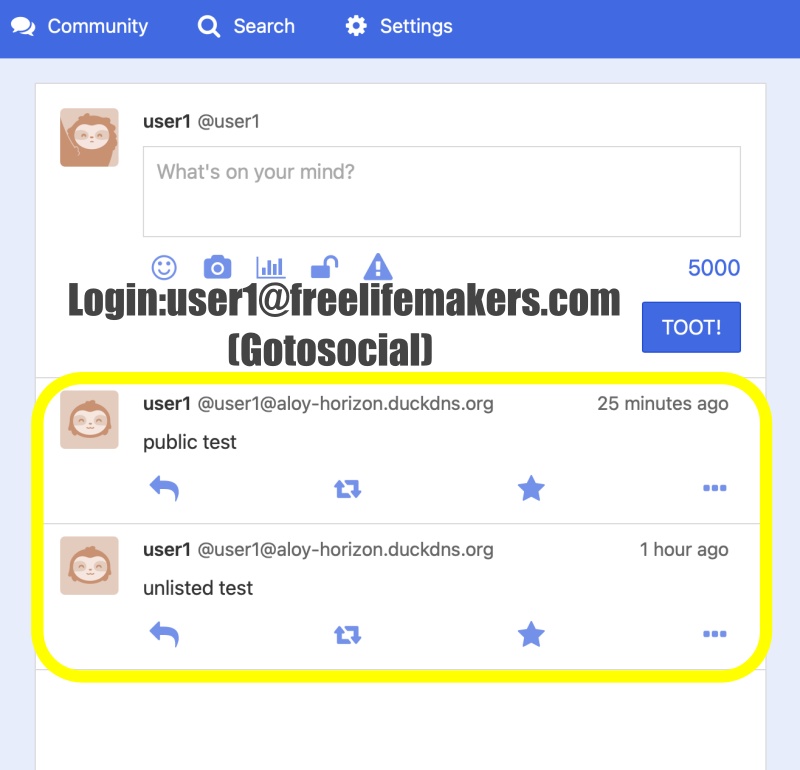
✔️ user1으로 로그인하고 @user1페이지 방문
Log in as user1 and visit the @user1 page.
✔️ user2로 로그인하고 @user1페이지 방문
Log in as user2 and visit @user1’s page.
✔️ 로그아웃하고 @user1페이지 방문
Log out and visit @user1’s page.
✔️ pinafore – user1@freelifemakers.com으로 로그인
pinafore – Log in as user1@freelifemakers.com
✔️ DB 확인 / Check DB
myapp48 % sqlite3 data.sqlite
SQLite version 3.51.0 2025-06-12 13:14:41
Enter ".help" for usage hints.
sqlite> SELECT id,visibility,content FROM posts ORDER BY created_at DESC LIMIT 3
   ...> ;
8ae0380a-6c14-4507-8caf-cf0411264cb6|unlisted|unlisted test
a2435541-db09-4b65-ad08-ae90d84dffdd|private|private test
cd3f6242-9b9b-4000-b648-0040e9dcbf40|public|form test
sqlite>
✔️ 글 직접 삭제 / Delete post directly
curl -X DELETE "https://aloy-horizon.duckdns.org/api/cleanup-orphan?id=cd3f6242-9b9b-4000-b648-0040e9dcbf40&username=user1"
요한복음 8장 32절 / John 8:32
“그리고 너희는 진리를 알게 될 것이며, 진리가 너희를 자유롭게 할 것이다.”
“Then you will know the truth ,and the truth will set you free”