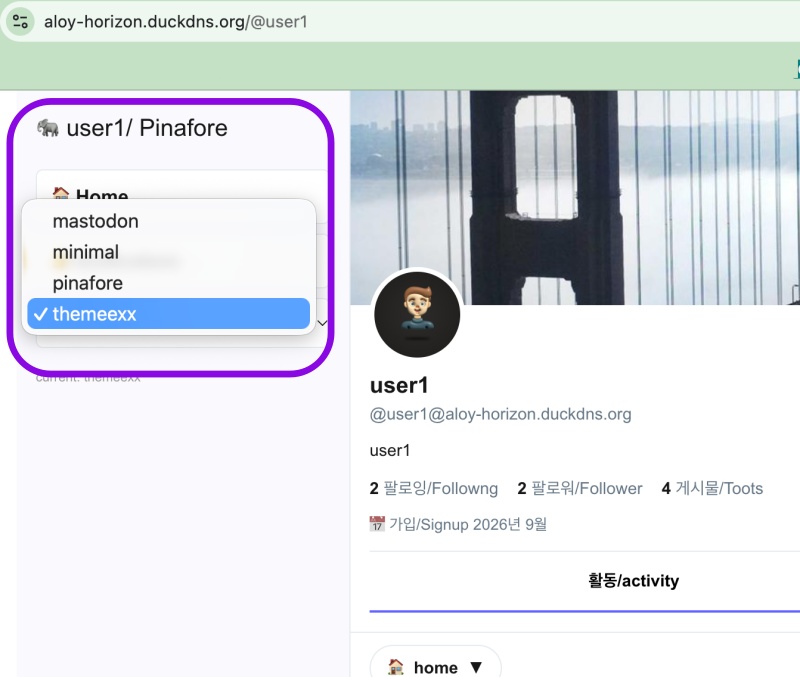
👉🏻 myapp58 은 nextjs서버 실행시(nextjs16) 발생하는 tailwind 오류와 액티브 테마 디렉토리나 파일이름 변경시 에러로그 발생 부분의 버그를 수정합니다.
myapp58 fixes bugs related to Tailwind errors occurring when running the Next.js server(Nextjs16) and error logs generated when changing the active theme directory or file names.
👉🏻 전체 코드는 깃허브에서 확인 할 수 있습니다.
You can find the full code on GitHub.
https://github.com/gideonslife01/flm-nextjs
📁 전체 프로젝트 구조 / Overall Project Structure
myapp project/
├── app/  (Next.js App Router)
│   ├── .well-known/webfinger/route.ts  -> webfinger
│   ├── api/follow/route.ts    -> Follow API(temporary)
│   ├── api/announce/route.ts  -> Boost(Announcement)
│   ├── api/like/route.ts.     -> Like API
│   ├── api/posts/route.ts     -> Writing API(deprecated)
│   ├── api/timeline/route.ts  -> Timeline API
│   ├── api/followinglist/route.ts  -> followinglist API
│   ├── api/followerslist/route.ts  -> followerslist API
│   ├── api/v1/instance/route.ts -> auth
│   ├── api/v1/apps/route.ts.    -> auth
│   ├── api/v1/accounts/verify_credentials/route.ts -> auth
│   ├── api/v1/statuses/route.ts -> Write Post
│   ├── api/v1/timelines/home/route.ts -> timeline
│   ├── api/v1/media/route.ts -> Image upload
│   ├── api/v1/media/[id]/route.ts  -> Image Delete
│   ├── api/v1/instance/rules/route.ts -> Feature not implemented.
│   ├── api/v1/instance/domain_blocks/route.ts -> Feature not implemented.
│   ├── api/v1/filters/route.ts -> Feature not implemented.
│   ├── api/v1/lists/route.ts -> Feature not implemented.
│   ├── api/v1/announcements/route.ts -> Feature not implemented.
│   ├── api/v1/timelines/public/route.ts -> Feature not implemented.
│   ├── api/v1/statuses/[id]/context/route.ts -> Post Check,Delete
│   ├── oauth/authorize/route.ts -> auth
│   ├── oauth/token/route.ts -> auth
│   ├── oauth/login-and-authorize/route.ts -> Tursky,Pinafore login processing
│   ├── oauth/revoke/route.ts -> Feature not implemented.
│   ├── api/v1/search/home/route.ts -> search
│   ├── api/v2/search/home/route.ts -> search
│   ├── api/v2/notifications/policy/route.ts-> Feature not implemented.
│   ├── api/v1/accounts/[id]/followers/route.ts -> followers
│   ├── api/v1/accounts/[id]/following/route.ts -> following
│   ├── api/v1/statuses/[id]/route.ts -> -> Post delete(pinafore)
│   ├── api/auth/signup/route.ts        -> Website Signup
│   ├── api/auth/login/route.ts         -> Website Login
│   ├── api/auth/logout/route.ts        -> Website Logout
│   ├── api/auth/refresh/route.ts       -> Refresh Token
│   ├── api/cleanup-orphan/route.ts     -> post,outbox clean up
│   ├── api/auth/me/route.tsx           -> Login Check
│   ├── auth/signup/page.tsx            -> Signup UI
│   ├── auth/signup/page.tsx            -> Login UI
│   ├── users/[username]/
│   │   ├── statuses/[id]/route.ts -> Indivisual Post
│   │   ├── route.ts               -> Acotr Information
│   │   ├── followers/route.ts     -> Followers List
│   │   ├── following/route.ts     -> Following List
│   │   ├── inbox/route.ts         -> Inbox
│   │   └── outbox/route.ts        -> outbox
│   ├── usersui/[username]/
│   │   ├── page.tsx               -> Timeline UI(Server, 404)
│   │   ├── ClientPage.tsx.        -> Timeline UI(Client,Call Active Themes)
│   │   └── _components/themes/
│   │       ├── themeex/ThemeexTheme.tsx   -> Example Theme
│   │       ├── pinafore/PinaforeTheme.tsx -> Theme 1
│   │       ├── pinafore/FollowersList.tsx -> Theme 1, FollowersList
│   │       ├── pinafore/FollowingList.tsx -> Theme 1, FollowingList
│   │       ├── pinafore/NotificationsList.tsx -> Theme 1, NotificationsList
│   │       ├── pinafore/TimelineList.tsx  -> Theme 1, TimelineList
│   │       ├── mastodon/MastodonTheme.tsx -> Theme 2
│   │       └── minimal/MinimaltTheme.tsx  -> Theme 3
│   ├── layout.tsx, page.tsx, globals.css
│   └── favicon.ico
├── lib/
│   ├── theme.tsx              -> Theme Provider
│   ├── watchThemes.ts         -> Check real-time theme changes
│   ├── auth.ts                -> Authentication, User Management
│   ├── ap.ts                  -> Follow,Undo,Create,Likes,Announce
│   ├── visibility.ts          -> Visibility(Public,Unlisted,Private,Direct)
│   └── db.ts                  -> DB connection
├── data/
│   ├── keys/userIDs/          -> private.pem, public.pem(New)
│   └── keys/                  -> private.pem, public.pem(legacy)
├── data.sqlite                -> Database(1/3)
├── data.sqlite-wal            -> Database(2/3)
├── data.sqlite-shm            -> Database(3/3)
├── Caddyfile                  -> https
├── instrumentation.ts         -> Background Server
├── proxy.ts                   -> middleware.ts - >proxy.ts(for Nextjs16)
├── postcss.config.mjs         -> for Nextjs16
└── package.json
📁 프로젝트 시작 / Project Start
📁 Nextj16 middleware.ts -> proxy.ts
✔️ 아래와 같은 경고 문구가 나오면 기존의 middleware.ts파일을 proxy.ts파일로 이름을 바꿉니다.
If a warning message like the one below appears, rename the existing middleware.ts file to proxy.ts.
— next.js16 middleware 경고 / Next.js 16 middleware warning
▲ Next.js 16.4.0 (Turbopack)
- Local:         http://localhost:3000
- Network:       http://192.168.0.10:3000
- Environments: .env.local
✓ Ready in 172ms
✓ Running next.config.ts took 14ms
⚠️ The "middleware" file convention is deprecated. Please use "proxy" instead.

  To migrate automatically, run:
  npx @next/codemod@canary middleware-to-proxy .

  Learn more: https://nextjs.org/docs/messages/middleware-to-proxy
✅ themes: [ 'mastodon', 'minimal', 'pinafore', 'themeex' ]
👀 Theme watcher started in background
— 코드 수정 / Code Modification
# middleware.ts파일을 proxy.ts로 이름을 바꾸고 코드를 아래처럼 수정
# Rename the `middleware.ts` file to `proxy.ts` and modify the code as shown below.

//export function middleware(req: NextRequest) {

// ✅ myapp58
export default function proxy(req: NextRequest) { ... ...}
📁 Tailwind error
✔️ 아래와 같은 오류 발생시 프로젝트 루트에 postcss.config.mjs 파일을 만들고 코드를 입력합니다.
If an error like the one below occurs, create a postcss.config.mjs file in the project root and enter the code.
— Error
Unknown at rule: @theme

Generated code of PostCSS transform of file content of app/globals.css:
./app/globals.css:8:7
   6 | }
   7 |
>  8 | @theme inline {
     |       ^
   9 |   --color-background: var(--background);
  10 |   --color-foreground: var(--foreground);
  11 |   --font-sans: var(--font-geist-sans);

Import trace:
  Client Component Browser:
    ./app/globals.css [Client Component Browser]
    ./app/layout.tsx [Server Component]
— 코드 / Code
# postcss.config.mjs
const config = {
  plugins: {
    "@tailwindcss/postcss": {},
  },
};

export default config;
— 모듈 설치 / module install
npm install -D @tailwindcss/postcss
# or
npm install -D tailwindcss @tailwindcss/postcss
✔️ 공식 문서 / Official Documentation (Tailwindcss for nextjs)
https://tailwindcss.com/docs/installation/framework-guides/nextjs
https://www.npmjs.com/package/@tailwindcss/postcss
📁 테마 디렉토리나 파일이름 변경시 서버로그에 에러 로그 출력 오류 수정
Fixed an issue where error logs were generated in the server logs when renaming theme directories or filenames.
✔️ 오류 / Error
⨯ ./app/usersui/[username]/_components/themes/index.ts:4:1
Error: Module not found: Can't resolve './themeex/PinaforeTheme'
✔️ lib/watchThemes.ts
      for (const folderName of folders) {
        const folderPath = path.join(themesDir, folderName);
        try {
... ...
          // ✅ myapp58
          // -  pinafore는 _Fallback
          if (folderName === 'pinafore') {
            registryLines += ` pinafore: { component: _Fallback, label: 'pinafore' },\n`;
          } else {
            // ✅ 정적 import 안함, require를 try/catch + eval로 감싸서 번들러가 파일 없어도 에러 안 내게
            registryLines += ` ${folderName}: { component: _load('./${folderName}/${fileBase}', '${exported}'), label: '${folderName}' },\n`;
          }
        } catch { continue; } // 폴더 읽기 실패하면 스킵 / Skip if folder reading fails
      }

      // ✅ myapp58 - write code to index.ts themeName.ts files
      // 디렉토리나 파일 인식 못하면 Pinafore테마로 대체 / If directories or files are not recognized, replace with the Pinafore theme.
      const indexContent = `import { PinaforeTheme as _Fallback } from './pinafore/PinaforeTheme';

function _load(path: string, exportName: string) {
  try {
    const mod = eval('require')(path);
    return mod[exportName] || mod.default || _Fallback;
  } catch {
    return _Fallback;
  }
}

export const themeRegistry = {
${registryLines}} as const;
export type ThemeName = keyof typeof themeRegistry;
export function getThemeComponent(name: ThemeName) {
  return themeRegistry[name]?.component?? _Fallback;
}
`;
      const namesContent = `export const themeNames = ${JSON.stringify(validFolders)} as const;
export type ThemeName = typeof themeNames[number];
`;
✔️ app/usersui/[username]/_components/themes/index.ts – 자동생성 파일 / Automatically generated file
— index.ts파일은 아래와 같은 형식으로생성 됩니다.
The index.ts file is generated in the following format.
import { PinaforeTheme as _Fallback } from './pinafore/PinaforeTheme';

function _load(path: string, exportName: string) {
  try {

    const mod = eval('require')(path);
    return mod[exportName] || mod.default || _Fallback;
  } catch {
    return _Fallback;
  }
}

export const themeRegistry = {
 mastodon: { component: _load('./mastodon/MastodonTheme', 'MastodonTheme'), label: 'mastodon' },
 minimal: { component: _load('./minimal/MinimalTheme', 'MinimalTheme'), label: 'minimal' },
 pinafore: { component: _Fallback, label: 'pinafore' },
 themeex: { component: _load('./themeex/Themetheme', 'Theme'), label: 'themeex' },
} as const;
export type ThemeName = keyof typeof themeRegistry;
export function getThemeComponent(name: ThemeName) {
  return themeRegistry[name]?.component?? _Fallback;
}
📁 테스트 / Test
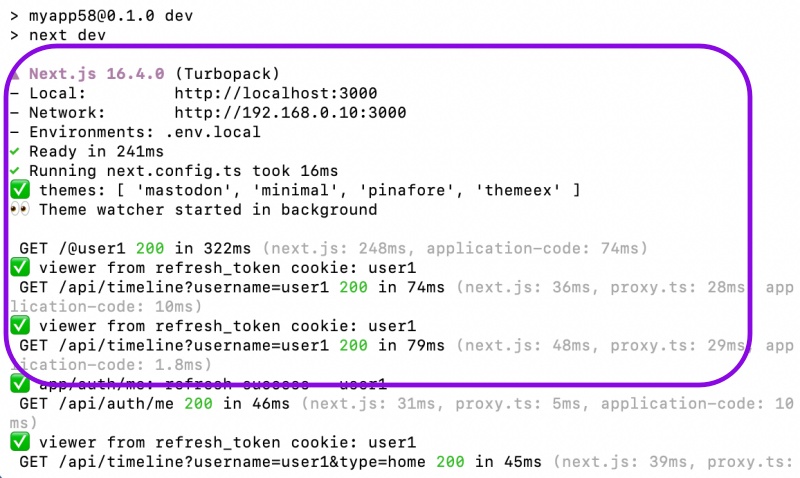
✔️ Tailwind
— 서버시작시 오류가 발생하지 않습니다.
No errors occur when starting the server.
✔️ 엑티브 테마 / Active Theme
— 테마 디렉토리나 파일이 추가 삭제 변경시 서버 오류 로그가 발생하지 않습니다.
No server error logs are generated when theme directories or files are added, deleted, or modified.
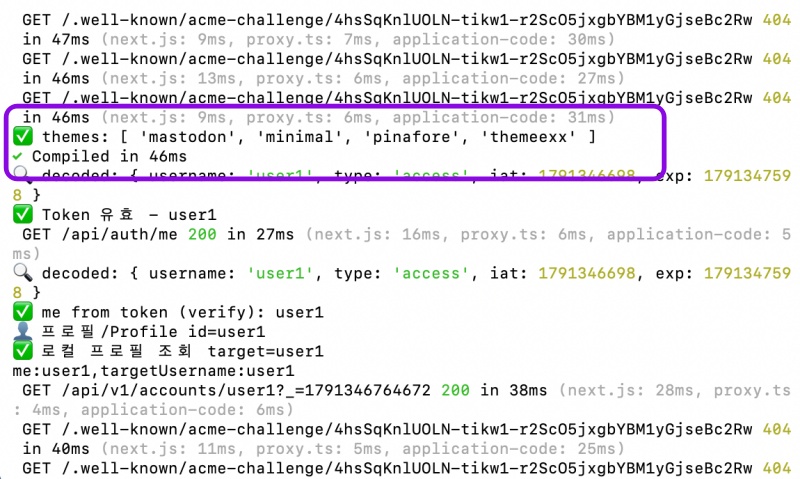
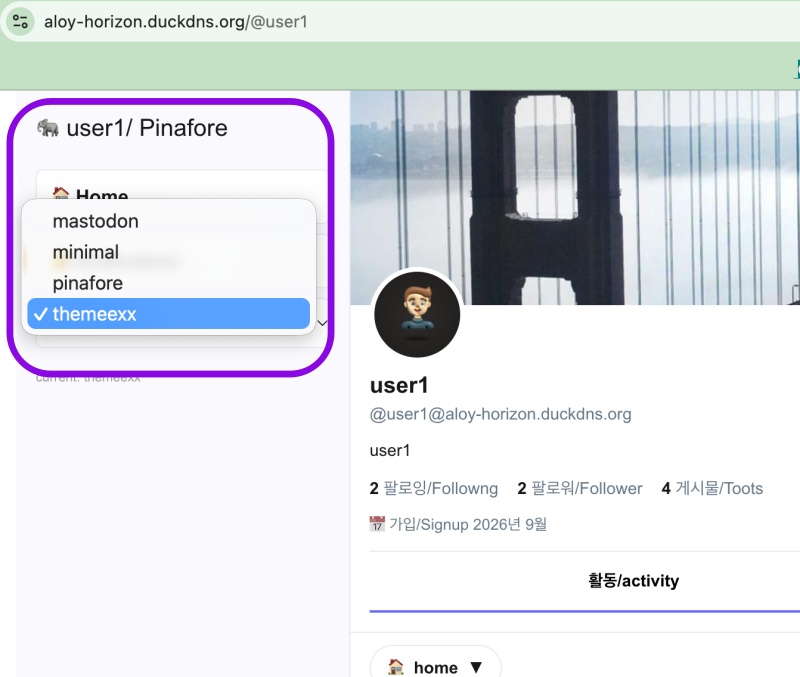
— 테마 리스트 변경 확인 / Check theme list changes
마태복음 21장 22절 / Matthew 21: 22
“너희가 기도할 때에 무엇이든지 믿고 구하는 것은 다 받으리라 하시니라”
“And everything you ask in prayer, believing, you will receive.”