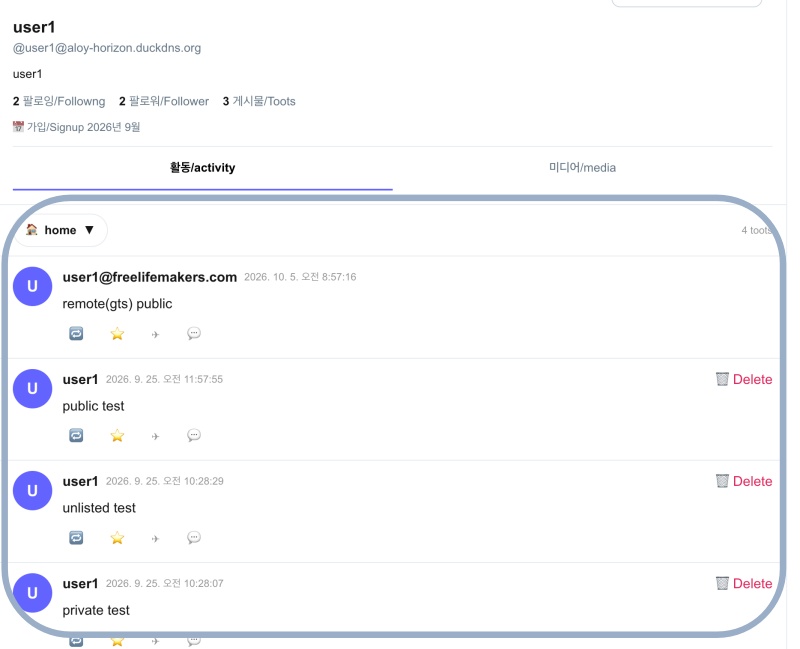
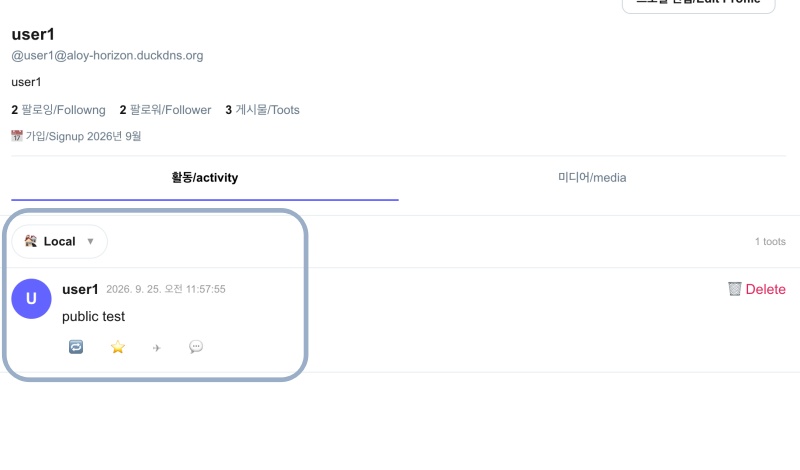
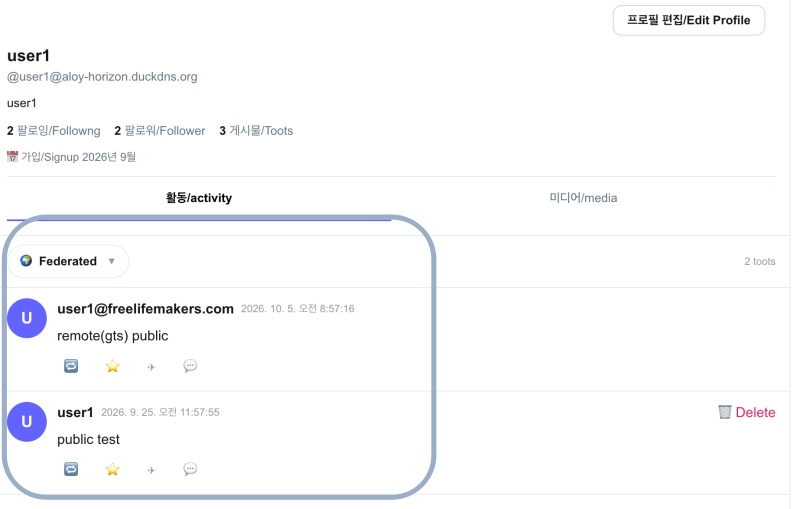
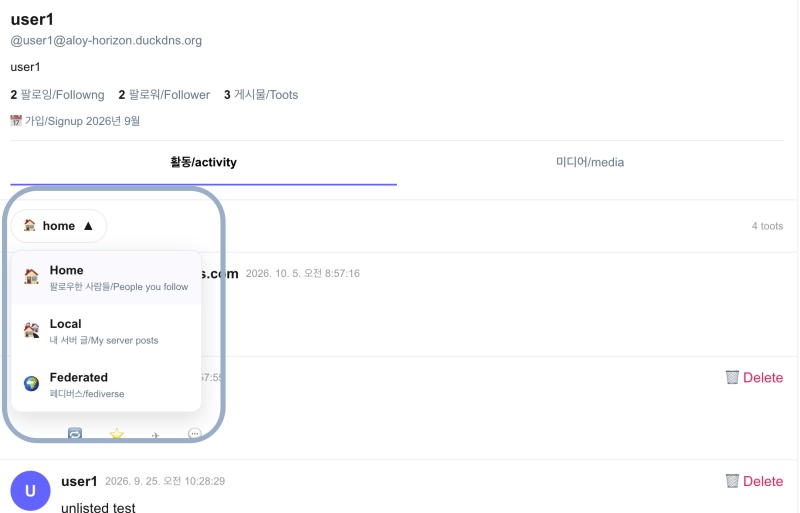
👉🏻 myapp56에서는 타임라인 글보기를 Home / Local / Federated 탭으로 볼 수 있습니다.
In myapp56, you can view the timeline under the Home, Local, and Federated tabs.
👉🏻 전체 코드는 깃허브에서 확인 할 수 있습니다.
You can find the full code on GitHub.
https://github.com/gideonslife01/flm-nextjs
📁 전체 프로젝트 구조 / Overall Project Structure
myapp project/
├── app/  (Next.js App Router)
│   ├── .well-known/webfinger/route.ts  -> webfinger
│   ├── api/follow/route.ts    -> Follow API(temporary)
│   ├── api/announce/route.ts  -> Boost(Announcement)
│   ├── api/like/route.ts.     -> Like API
│   ├── api/posts/route.ts     -> Writing API(deprecated)
│   ├── api/timeline/route.ts  -> Timeline API
│   ├── api/followinglist/route.ts  -> followinglist API
│   ├── api/followerslist/route.ts  -> followerslist API
│   ├── api/v1/instance/route.ts -> auth
│   ├── api/v1/apps/route.ts.    -> auth
│   ├── api/v1/accounts/verify_credentials/route.ts -> auth
│   ├── api/v1/statuses/route.ts -> Write Post
│   ├── api/v1/timelines/home/route.ts -> timeline
│   ├── api/v1/media/route.ts -> Image upload
│   ├── api/v1/media/[id]/route.ts  -> Image Delete
│   ├── api/v1/instance/rules/route.ts -> Feature not implemented.
│   ├── api/v1/instance/domain_blocks/route.ts -> Feature not implemented.
│   ├── api/v1/filters/route.ts -> Feature not implemented.
│   ├── api/v1/lists/route.ts -> Feature not implemented.
│   ├── api/v1/announcements/route.ts -> Feature not implemented.
│   ├── api/v1/timelines/public/route.ts -> Feature not implemented.
│   ├── oauth/authorize/route.ts -> auth
│   ├── oauth/token/route.ts -> auth
│   ├── oauth/login-and-authorize/route.ts -> Tursky,Pinafore login processing
│   ├── oauth/revoke/route.ts -> Feature not implemented.
│   ├── api/v1/search/home/route.ts -> search
│   ├── api/v2/search/home/route.ts -> search
│   ├── api/v2/notifications/policy/route.ts-> Feature not implemented.
│   ├── api/v1/accounts/[id]/followers/route.ts -> followers
│   ├── api/v1/accounts/[id]/following/route.ts -> following
│   ├── api/v1/statuses/[id]/route.ts -> -> Post delete(pinafore)
│   ├── api/auth/signup/route.ts        -> Website Signup
│   ├── api/auth/login/route.ts         -> Website Login
│   ├── api/auth/logout/route.ts        -> Website Logout
│   ├── api/auth/refresh/route.ts       -> Refresh Token
│   ├── api/cleanup-orphan/route.ts     -> post,outbox clean up
│   ├── api/auth/me/route.tsx           -> Login Check
│   ├── auth/signup/page.tsx            -> Signup UI
│   ├── auth/signup/page.tsx            -> Login UI
│   ├── users/[username]/
│   │   ├── statuses/[id]/route.ts -> Indivisual Post
│   │   ├── route.ts               -> Acotr Information
│   │   ├── followers/route.ts     -> Followers List
│   │   ├── following/route.ts     -> Following List
│   │   ├── inbox/route.ts         -> Inbox
│   │   └── outbox/route.ts        -> outbox
│   ├── usersui/[username]/
│   │   ├── page.tsx               -> Timeline UI(Server, 404)
│   │   ├── ClientPage.tsx.        -> Timeline UI(Client,Call Active Themes)
│   │   └── _components/themes/
│   │       ├── themeex/ThemeexTheme.tsx   -> Example Theme
│   │       ├── pinafore/PinaforeTheme.tsx -> Theme 1
│   │       ├── pinafore/FollowersList.tsx -> Theme 1, FollowersList
│   │       ├── pinafore/FollowingList.tsx -> Theme 1, FollowingList
│   │       ├── pinafore/NotificationsList.tsx -> Theme 1, NotificationsList
│   │       ├── pinafore/TimelineList.tsx  -> Theme 1, TimelineList
│   │       ├── mastodon/MastodonTheme.tsx -> Theme 2
│   │       └── minimal/MinimaltTheme.tsx  -> Theme 3
│   ├── layout.tsx, page.tsx, globals.css
│   └── favicon.ico
├── lib/
│   ├── theme.tsx              -> Theme Provider
│   ├── watchThemes.ts         -> Check real-time theme changes
│   ├── auth.ts                -> Authentication, User Management
│   ├── ap.ts                  -> Follow,Undo,Create,Likes,Announce
│   ├── visibility.ts          -> Visibility(Public,Unlisted,Private,Direct)
│   └── db.ts                  -> DB connection
├── data/
│   ├── keys/userIDs/          -> private.pem, public.pem(New)
│   └── keys/                  -> private.pem, public.pem(legacy)
├── data.sqlite                -> Database(1/3)
├── data.sqlite-wal            -> Database(2/3)
├── data.sqlite-shm            -> Database(3/3)
├── Caddyfile                  -> https
├── instrumentation.ts         -> Background Server
└── package.json
📁 프로젝트 시작 / Project Start
📁 기능설명 / Feature Description
✔️ Home
— 페이지 소유자가 로그인 한 경우 public, unlisted, private 모두 볼 수 있음
If the page owner is logged in, they can view public, unlisted, and private content.
— 내가 팔로우 한 사람 글을 볼 수 있음.(내 서버로 배달된 글)
You can view posts from people you follow (posts delivered to your server).
— Unlisted는 Local과 Pederated에 공개 안됨
Unlisted items are not visible in the Local or Federated timelines.
✔️ Local
— 내 서버의 Public글은 전부 보임.
All public posts on my server are visible.
✔️ Federated
— 내 서버와 연결된 다른 서버의 Public글은 전부 보임.
All public posts from other servers connected to my server are visible.
✔️ Private
— 페이지 소유자를 팔로우 한 사람만 볼 수 있음
Visible only to people who follow the page owner.
✔️ Direct
— 페이지 소유자+멘션된 사람이 볼 수 있음.
Visible to the page owner and mentioned individuals.
📁 코드수정 / Code Modification
💡 아래 라우트는 구현되지 않은 마스토돈 호환 라우트로 가장 나중에 구현 예정
The route below is a Mastodon-compatible route that has not yet been implemented and is scheduled for implementation last.
api/v1/instance/rules/route.ts
api/v1/instance/domain_blocks/route.ts
api/v1/filters/route.ts
api/v1/lists/route.ts
api/v1/announcements/route.ts
api/v1/timelines/public/route.ts
oauth/login-and-authorize/route.ts
api/v2/notifications/policy/route.ts
✔️ API수정 / API Modification
— app/api/timeline/route.ts – 코드 수정 / Code Modification
... ...
export async function GET(req: Request) {
... ...
const type = searchParams.get('type') || 'home'; // ✅ myapp56 - add : home, local, federated
... ...
  // ✅ myapp56 - add type: home, local, federated
  let rawTimeline: any[] = [];

  if (type === 'local') {
    // - Local: My server posts( visibility == public )
    rawTimeline = db.prepare(`
      SELECT id, content, username, username as actor, created_at, visibility, 'Note' as type, 'mine' as source, id as original_id
      FROM posts WHERE visibility='public'
      ORDER BY created_at DESC LIMIT 80
    `).all() as any[];

  } else if (type === 'federated') {
    // - Federated: posts + inbox_posts (visibivlity == public)
    rawTimeline = db.prepare(`
      SELECT id, content, username, username as actor, created_at, visibility, 'Note' as type, 'mine' as source, id as original_id
      FROM posts WHERE visibility='public'
      UNION ALL
      SELECT id, content, username, actor, created_at, visibility, type, 'inbox' as source, original_id
      FROM inbox_posts WHERE visibility='public'
      ORDER BY created_at DESC LIMIT 80
    `).all() as any[];

  } else {
    // - Home: 내 타임라인/My timeline + inbox_posts + posts
    rawTimeline = db.prepare(`
      SELECT id, content, username, username as actor, created_at, visibility, 'Note' as type, 'mine' as source, id as original_id
      FROM posts WHERE username =?
      UNION ALL
      SELECT id, content, username, actor, created_at, visibility, type, 'inbox' as source, original_id
      FROM inbox_posts WHERE username =?
      ORDER BY created_at DESC LIMIT 80
    `).all(username, username) as any[];
  }
... ...
}
✔️ 테마 파일 수정 / Edit theme files
— app/usersui/[username]/_components/themes/pinafore/TimelineList.tsx
// ✅ myapp56 - Hom,Local,Federated 탭 추가 / Add Hom, Local, Federated Tabs
type TabType = 'home' | 'local' | 'federated';
type Props = {
  timeline: any[];
  currentUser: string | null;
  tab: TabType;
  onTabChange: (t: TabType) => void;
  onDelete: (id: string) => void;
  onBoost: (p: any) => void;
  onLike: (p: any) => void;
  onShare: (p: any) => void;
};

export default function TimelineList({
  timeline, currentUser, tab, onTabChange, onDelete, onBoost, onLike, onShare }: Props) {
  const [showDropdown, setShowDropdown] = useState(false); // ✅ myapp56 - Hom,Local,Federated 탭 추가 / Add Hom, Local, Federated Tabs

... ...
  return (
    <>
      <style>{`
             /* ✅ myapp56 - timeline source tabs */
            .timeline-dropdown-wrap {
              display: flex;
              justify-content: space-between;
              align-items: center;
              padding: 10px 16px;
              border-bottom: 1px solid #e6ecf0;
              background: white;
              position: sticky;
              top: 0;
              z-index: 5;
            }
            .timeline-dropdown { position: relative; }
            .dropdown-toggle {
              display: flex;
              align-items: center;
              gap: 8px;
              padding: 8px 14px;
              border: 1px solid #e6ecf0;
              border-radius: 20px;
              background: white;
              cursor: pointer;
              font-size: 14px;
              font-weight: 600;
            }
            .dropdown-toggle:hover { background: #f3f4f6; }
            .dropdown-arrow { font-size: 10px; color: #999; margin-left: 4px; }
            .dropdown-menu {
              position: absolute;
              top: 100%;
              left: 0;
              margin-top: 8px;
              width: 220px;
              background: white;
              border: 1px solid #e6ecf0;
              border-radius: 12px;
              box-shadow: 0 8px 24px rgba(0,0,0,0.12);
              overflow: hidden;
              z-index: 10;
            }
            .dropdown-menu button {
              width: 100%;
              display: flex;
              gap: 12px;
              align-items: center;
              padding: 12px 14px;
              border: none;
              background: white;
              text-align: left;
              cursor: pointer;
            }
            .dropdown-menu button:hover { background: #f7f9fa; }
            .dropdown-menu button.active { background: #fafafe; }
            .dropdown-menu button span:first-child { font-size: 18px; }
            .dropdown-menu button div { display: flex; flex-direction: column; }
            .dropdown-menu button b { font-size: 14px; }
            .dropdown-menu button small { font-size: 11px; color: #657786; }
            .timeline-count { font-size: 12px; color: #999; }

      `}</style>

      {/* ✅ myapp56 - Hom,Local,Federated 탭 추가 / Add Hom, Local, Federated Tabs */}
      <div className="timeline-dropdown-wrap">
        <div className="timeline-dropdown">
          <button className="dropdown-toggle" onClick={()=>setShowDropdown(!showDropdown)}>
            <span>{tab==='home'?'🏠': tab==='local'?'🏘':'🌍'}</span>
            <span>{tab}</span>
            <span>{showDropdown?'▲':'▼'}</span>
          </button>
          {showDropdown && (
            <div className="dropdown-menu">
              <button className={tab==='home'?'active':''} onClick={()=>{onTabChange('home'); setShowDropdown(false);}}>🏠 Home</button>
              <button className={tab==='local'?'active':''} onClick={()=>{onTabChange('local'); setShowDropdown(false);}}>🏘 Local</button>
              <button className={tab==='federated'?'active':''} onClick={()=>{onTabChange('federated'); setShowDropdown(false);}}>🌍 Federated</button>
            </div>
          )}
        </div>
        <div className="timeline-count">{timeline.length} toots</div>
      </div>

      {timeline.map((p: any) => (
        <article key={`${p.source}-${p.id}`} className="pinafore-status">
          <Avatar actor={p.actor} username={p.username} />
          <div className="status-content">
            <div className="status-header">
              <b>{getDisplayName(p.actor)}</b>
              <span className="status-time">{new Date(p.created_at).toLocaleString()}</span>
              {p.isBoostedPost && <span className="boost-label">🔁 {getDisplayName(p.actor)}</span>}
              {currentUser && p.isMine && (
                <button onClick={() => onDelete(p.id)} style={{ color: '#e0245e', marginLeft: 'auto' }}>
                  🗑 Delete
                </button>
              )}
            </div>
            <div className="status-text" dangerouslySetInnerHTML={{ __html: p.content }} />
            {p.media_attachments && p.media_attachments.length > 0 && (
              <div className={`status-media ${p.media_attachments.length === 1 ? 'single' : ''}`}>
                {p.media_attachments.map((m: any) => (
                  <img key={m.id} src={toAbsolute(m.preview_url || m.url)} alt="media" loading="lazy" />
                ))}
              </div>
            )}
            <div className="status-actions">
              <button onClick={() => onBoost(p)} className={p.isMyBoost ? 'boosted' : ''}>🔁 {p.boostCount || ''}</button>
              <button onClick={() => onLike(p)} className={p.isMyLike ? 'liked' : ''}>⭐ {p.likeCount || ''}</button>
              <button onClick={() => onShare(p)}>✈</button>
              <button>💬</button>
            </div>
          </div>
        </article>
      ))}
    </>
  );

}
— app/usersui/[username]/_components/themes/pinafore/PinaforeTheme.tsx
// ✅ myapp56 - Home, Local, Federated 탭 선택 상태 / Home, Local, Federated tab selection state
  const [tab, setTab] = useState<'home'|'local'|'federated'>('home');
... ...
// ✅ myapp56
  // - Home / Local / Federated 탭 로직
  // / Home / Local / Federated tab logic
  useEffect(() => {
    if (view !== 'timeline') return;
    // 프로필 페이지면 username 기반, 아니면 type 기반
    // If it's a profile page, use username-based; otherwise, use type-based.
    const url = tab === 'home'
      ? `/api/timeline?username=${username}&type=home`
      : `/api/timeline?type=${tab}`;

    fetch(url, { credentials: 'include', cache: 'no-store' })
      .then(r => r.json())
      .then(data => setTimeline(data))
      .catch(e => console.error('tab fetch fail', e));
  }, [tab, username, view]);

  return (
    <> ... ...

          {view === 'timeline' && (
            <>
            {/* ✅ myapp56 - ADD Dropdown(Home/Local/Federated Tabs ) */}

              <TimelineList
                timeline={timeline}
                tab={tab}
                onTabChange={setTab}
                currentUser={currentUser}
                onDelete={handleDelete}
                onBoost={handleBoostClick}
                onLike={handleLikeClick}
                onShare={onShare}
              />
            </>
          )} {/* end view === 'timeline' */}

   ... ... </>

 );
✔️ lib/visibility.ts – visibility 규칙에 맞게 수정 / Modify to comply with visibility rules.
export function canSee(viewer: string | null, post: any): boolean {
  const vis = (post.visibility || 'public') as Visibility;

  if (vis === 'public') return true;
  if (vis === 'unlisted') return true; // 누구나 볼 수 있음 (익명 포함) / Anyone can see (including anonymous)

  if (!viewer) return false; // private, direct는 로그인 필요 / Login required for private, direct

  if (post.username === viewer) return true; // 내 글은 다 보임 / I can see all my posts

  if (vis === 'private') {
    return isFollower(viewer, post.username); // 팔로워만 / Only followers can see
  }

  if (vis === 'direct') {
    // 멘션된 사람만 / Only mentioned users can see
    const mentions = post.mentions || [];
    return mentions.includes(viewer);
  }

  return false;
}
📁 테스트 / Test
✔️ Hom,Local,Federated
✔️ 드롭다운 메뉴 / Dropdown menu
요한복음 8장 32절 / John 8:32
“그리고 너희는 진리를 알게 될 것이며, 진리가 너희를 자유롭게 할 것이다.”
“Then you will know the truth ,and the truth will set you free”