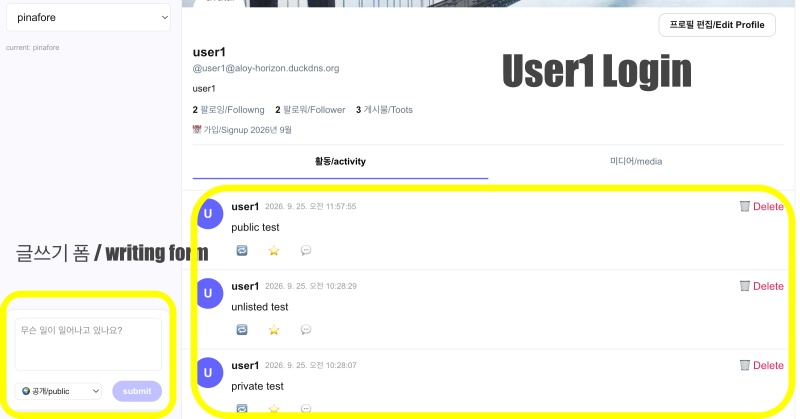
👉🏻 myapp47에서 추가된 사항 입니다.
These are the additions made in myapp47.
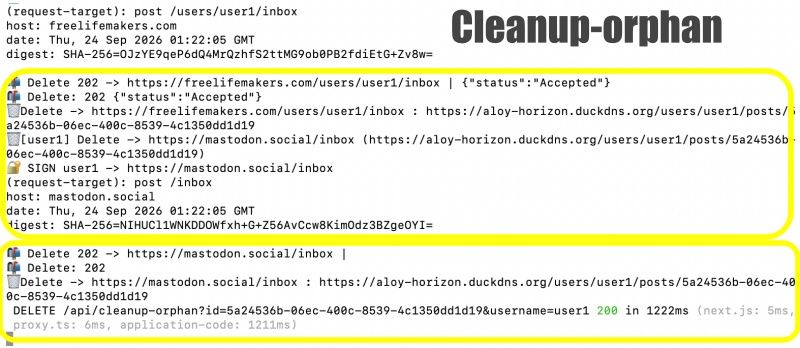
✔️ api/clenaup-orphan 라우트로 해당글을 직접 삭제 할 수 있습니다.
You can delete the post directly using the api/cleanup-orphan route.
✔️ app/users/[username]/statuses/[id]/route.ts 이 라우트에 tombstone이 추가되었습니다.
A tombstone has been added to the app/users/[username]/statuses/[id]/route.ts route.
✔️ app/api/v1/statuses/[id]/route.ts 라우트가 추가되었습니다.(pinafore에서 글 삭제 할 때 사용 )
The app/api/v1/statuses/[id]/route.ts route has been added (used for deleting posts in Pinafore).
✔️ 아래의 기능 테스트를 완료했습니다.
I have completed the functional tests below.
— 테스트는 고투소셜 서버(freelifemakers.com)를 기준으로 테스트합니다.
Testing is conducted based on the GoToSocial server (freelifemakers.com).
— 로컬서버에 글쓰고 리모트서버에 배달확인
Write a post on the local server and verify delivery to the remote server.
— 로컬서버의 글 삭제시 리모트 서버 삭제 확인
Verify deletion on the remote server when deleting a post on the local server.
— 리모트 서버에 글 쓰고 로컬서버로 배달되는지 확인
Write a post on the remote server and verify if it is delivered to the local server.
— 리모트 서버의 글 삭제시 로컬서버 글도 삭제되는지 확인
Check whether the local server post is also deleted when the remote server post is deleted.
— pinafore에서 글 삭제시 로컬서버 글 삭제되는지 확인
Check if the post is deleted from the local server when deleted in Pinafore.
👉🏻 전체 코드는 깃허브에서 확인 할 수 있습니다.
You can find the full code on GitHub.
https://github.com/gideonslife01/flm-nextjs
📁 전체 프로젝트 구조 / Overall Project Structure
myapp project/
├── app/  (Next.js App Router)
│   ├── .well-known/webfinger/route.ts  -> webfinger
│   ├── api/follow/route.ts    -> Follow API(temporary)
│   ├── api/announce/route.ts  -> Boost(Announcement)
│   ├── api/like/route.ts.     -> Like API
│   ├── api/posts/route.ts     -> Writing API
│   ├── api/timeline/route.ts  -> Timeline API
│   ├── api/followinglist/route.ts  -> followinglist API
│   ├── api/followerslist/route.ts  -> followerslist API
│   ├── api/v1/instance/route.ts -> auth
│   ├── api/v1/apps/route.ts.    -> auth
│   ├── api/v1/accounts/verify_credentials/route.ts -> auth
│   ├── api/v1/statuses/route.ts -> Write Post
│   ├── api/v1/timelines/home/route.ts -> timeline
│   ├── oauth/authorize/route.ts -> auth
│   ├── oauth/token/route.ts -> auth
│   ├── api/v1/search/home/route.ts -> search
│   ├── api/v2/search/home/route.ts -> search
│   ├── api/v1/accounts/[id]/followers/route.ts -> followers
│   ├── api/v1/accounts/[id]/following/route.ts -> following
│   ├── api/v1/statuses/[id]/route.ts -> -> Post delete(pinafore)
│   ├── api/auth/signup/route.ts        -> Signup
│   ├── api/auth/login/route.ts         -> Login
│   ├── api/auth/logout/route.ts        -> Logout
│   ├── api/auth/refresh/route.ts       -> Refresh Token
│   ├── api/cleanup-orphan/route.ts     -> post,outbox clean up
│   ├── api/auth/me/route.tsx           -> Login Check
│   ├── auth/signup/page.tsx            -> Signup UI
│   ├── auth/signup/page.tsx            -> Login UI
│   ├── users/[username]/
│   │   ├── statuses/[id]/route.ts -> Indivisual Post
│   │   ├── route.ts               -> Acotr Information
│   │   ├── followers/route.ts     -> Followers List
│   │   ├── following/route.ts     -> Following List
│   │   ├── inbox/route.ts         -> Inbox
│   │   └── outbox/route.ts        -> outbox
│   ├── usersui/[username]/
│   │   ├── page.tsx               -> Timeline UI(Server, 404)
│   │   ├── ClientPage.tsx.        -> Timeline UI(Client,Call Active Themes)
│   │   └── _components/themes/
│   │       ├── themeex/ThemeexTheme.tsx   -> Example Theme
│   │       ├── pinafore/PinaforeTheme.tsx -> Theme 1
│   │       ├── pinafore/FollowersList.tsx -> Theme 1, FollowersList
│   │       ├── pinafore/FollowingList.tsx -> Theme 1, FollowingList
│   │       ├── pinafore/NotificationsList.tsx -> Theme 1, NotificationsList
│   │       ├── mastodon/MastodonTheme.tsx -> Theme 2
│   │       └── minimal/MinimaltTheme.tsx  -> Theme 3
│   ├── layout.tsx, page.tsx, globals.css
│   └── favicon.ico
├── lib/
│   ├── theme.tsx              -> Theme Provider
│   ├── watchThemes.ts         -> Check real-time theme changes
│   ├── auth.ts                -> Authentication, User Management
│   ├── ap.ts                  -> Follow,Undo,Create,Likes,Announce
│   └── db.ts                  -> DB connection
├── data/
│   ├── keys/userIDs/          -> private.pem, public.pem(New)
│   └── keys/                  -> private.pem, public.pem(legacy)
├── data.sqlite                -> Database(1/3)
├── data.sqlite-wal            -> Database(2/3)
├── data.sqlite-shm            -> Database(3/3)
├── Caddyfile                  -> https
├── instrumentation.ts         -> Background Server
└── package.json
📁 프로젝트 시작 / Project Start
📁 cleanup-orphan 라우트 사용방법
How to use the cleanup-orphan route
✔️ 사용방법 / How to Use
# 1. 전체 삭제 정보확인 (GET)
# Check Bulk Deletion Information (GET)
Check Bulk Deletion Information (GET)

curl "https://aloy-horizon.duckdns.org/api/cleanup-orphan?username=user1"

# 터미널에서 실행 예 / Example run in terminal
curl "https://aloy-horizon.duckdns.org/api/cleanup-orphan?id=5a24536b-06ec-400c-8539-4c1350dd1d19&username=user1"

# 2. 유령글만 삭제 (posts와 outbox 불일치 하는 경우)
# Delete only "ghost posts" (cases where there is a mismatch between `posts` and `outbox`)

curl -X POST https://aloy-horizon.duckdns.org/api/cleanup-orphan \
  -H "Content-Type: application/json"
  -d '{"username":"user1"}'

# 3. 리모트(GoToSocial, Mastodon) + 로컬 전체 삭제
# Delete all remote (GoToSocial, Mastodon) + local data

curl -X DELETE "https://aloy-horizon.duckdns.org/api/cleanup-orphan?username=user1&all=true"

# 리모트 + 로컬 글 직접삭제 / Directly delete remote + local posts
curl -X DELETE "https://aloy-horizon.duckdns.org/api/cleanup-orphan?id=5a24536b-06ec-400c-8539-4c1350dd1d19&username=user1"

# - 터미널에서 실행 / Run in the terminal
curl -X DELETE "https://aloy-horizon.duckdns.org/api/cleanup-orphan?id=5a24536b-06ec-400c-8539-4c1350dd1d19&username=user1"

# - 응답 / Response
{"message":"✅ 5a24536b-06ec-400c-8539-4c1350dd1d19 리모트+로컬 삭제 완료! 이제 410 Tombstone!","deletedId":"5a24536b-06ec-400c-8539-4c1350dd1d19","tombstoneUrl":"https://aloy-horizon.duckdns.org/users/user1/statuses/5a24536b-06ec-400c-8539-4c1350dd1d19","followersCount":2}
📁 코드 수정 / Code Modification
✔️ app/users/[username]/inbox/route.ts
— 리모트 서버(고투소셜)에서 글을 쓰면 내 서버에 배달됩니다.
When you write a post on a remote server (GoToSocial), it is delivered to your server.
— 리모트 서버에서 글 삭제시 내 서버에 배달된 글도 삭제하는 기능을 추가합니다.
Adds a feature to delete posts delivered to your server when they are deleted on the remote server.
   ... ...
   // ✅ myapp47 - 배달된 글 삭제 / Delete delivered message
         try {
            // GoToSocial Delete는 object가 string 또는 object
            // In GoToSocial Delete, the object is either a string or an object.
            // object: "https://freelifemakers.com/users/user1/statuses/xxx"
            let objectId = typeof body.object === 'string'? body.object : body.object?.id;

            // Tombstone인 경우
            if (!objectId && typeof body.object === 'object') {
              objectId = body.object?.id || body.object;
            }

            console.log(`🗑 [${username}] Delete 도착! 삭제할 글: ${objectId}`);

            if (objectId) {
              const shortId = objectId.split('/').pop()?.split('#')[0]?.split('?')[0];
              // ✅ myapp47
              // 1. original_id 정확히 일치 / Exact match for original_id
              let result = db.prepare('DELETE FROM inbox_posts WHERE original_id=?').run(objectId);

              // 2. 짧은 ID로 LIKE 검색 (posts/ vs statuses/ 호환 + 옛날 ID 호환)
              // LIKE search using short IDs (compatible with posts/ vs. statuses/ and legacy IDs)
              if (result.changes === 0 && shortId) {
                result = db.prepare('DELETE FROM inbox_posts WHERE original_id LIKE?').run(`%${shortId}%`);
              }

              // 3. id 컬럼에 shortId로 저장된 경우
              // When stored as a shortId in the id column
              if (result.changes === 0 && shortId) {
                result = db.prepare('DELETE FROM inbox_posts WHERE id=? OR id LIKE?').run(shortId, `%${shortId}%`);
              }

              // 4. content 안에 ID가 있는 경우 (GoToSocial이 content에 URL 넣어두는 경우)
              // When there is an ID within the content (e.g., when GoToSocial embeds a URL in the content)
              if (result.changes === 0 && shortId) {
                try {
                  result = db.prepare('DELETE FROM inbox_posts WHERE content LIKE?').run(`%${shortId}%`);
                } catch {}
              }

              console.log(`✅ [${username}] inbox_posts 삭제 완료! changes=${result.changes} id=${shortId} objectId=${objectId}`);
            }
        } catch (e) {
          console.error(`❌ Delete 처리 실패 / Delete failed `, e);
        }
        return new Response('', { status: 202 });
... ...
✔️ app/users/[username]/statuses/[id]/route.ts
— Tombstone을 추가 합니다.(요청이 있는 서버를 위해서 구현)
Adds a tombstone (implemented for servers that requested it).
— 내 서버 원본 글 삭제시 글이 배달된 서버에 내 글 삭제 해달라는 DELETE요청을 보냅니다.
When the original post is deleted from my server, a DELETE request is sent to the servers where the post was delivered, asking them to delete it.
— 리모트서버가 DELETE 요청을 받으면 내 서버에서 app/users/[username]/statuses/[id] 이 라우트를 실행합니다.
When the remote server receives a DELETE request, it executes the app/users/[username]/statuses/[id] route on my server.
— 이 라우트는 원본글을 내 데이터베이스에서 검색후 글이 없는게 확인되면 tombstone 으로 응답합니다.
This route searches my database for the original post and responds with a tombstone if it confirms the post does not exist.
— tombstone을 리모트 서버가 확인하면 글을 실제로 삭제합니다.
When the remote server verifies the tombstone, it actually deletes the post.
— tombstone을 확인 하는 이유는 허위 delete요청으로 글 삭제되는걸 방지 하기 위함입니다.
The reason for checking the tombstone is to prevent posts from being deleted due to fraudulent delete requests.
... ...
export async function GET(
  req: Request,
  { params }: { params: Promise<{ username: string; id: string }> }
) {
... ...
  if (!post) {
    //  404 말고 410 + Tombstone, GoToSocial, Mastodon에 삭제 확인 용
    // For deletion confirmation on Tombstone, GoToSocial, Mastodon instead of 404 410
    console.log(`🪦 Tombstone 응답: ${id}`);
    return NextResponse.json({
      '@context': 'https://www.w3.org/ns/activitystreams',
      id: `https://${DOMAIN}/users/${username}/statuses/${id}`,
      type: 'Tombstone', // ⭐️
      formerType: 'Note',
      deleted: new Date().toISOString()
    }, {
      status: 410, // 410 Gone
      headers: {
        'Content-Type': 'application/activity+json; charset=utf-8',
        'Access-Control-Allow-Origin': '*'
      }
    });
  }

  // id, url 모두 /statuses/로 일치 시킴 / Match both id and url to /statuses/
  const note = {
    '@context': 'https://www.w3.org/ns/activitystreams',
    id: `https://${DOMAIN}/users/${username}/statuses/${id}`,
    type: 'Note',
    attributedTo: `https://${DOMAIN}/users/${username}`,
    content: post.content?.startsWith('<p>') ? post.content : `<p>${post.content}</p>`,
    published: new Date(post.created_at || Date.now()).toISOString(),
    to: ['https://www.w3.org/ns/activitystreams#Public'],
    cc: [`https://${DOMAIN}/users/${username}/followers`],
    url: `https://${DOMAIN}/users/${username}/statuses/${id}`
  };
... ...
}
... ...
📁 테스트 / Test
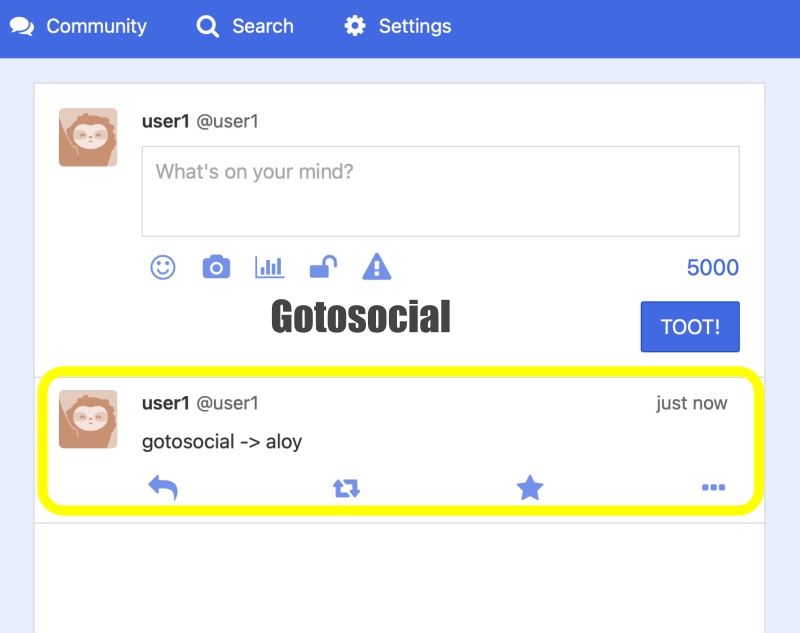
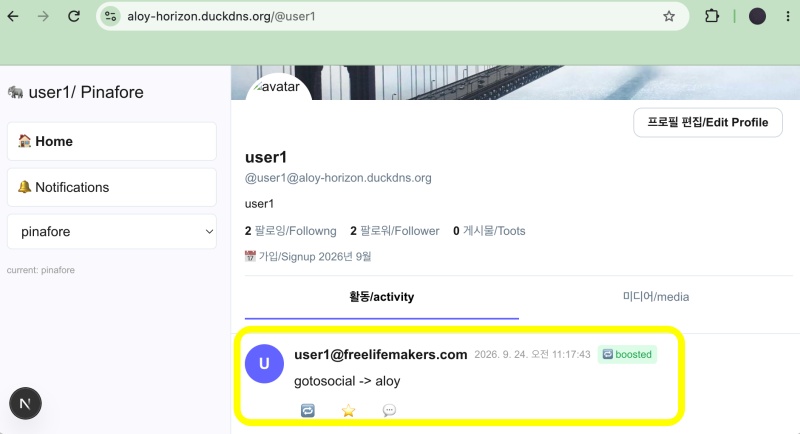
✔️ 고투소셜에서 글 작성시 로컬서버로 글 배달되는지 확인
Verify if posts are delivered to the local server when creating a post on GoToSocial.
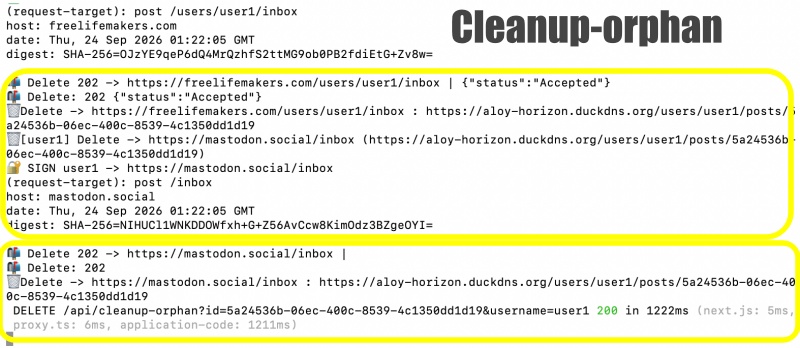
✔️ 리모트글 및 로컬 글 직접삭제(cleanup-orphan)
Direct deletion of remote and local entries
— 터미널에서 실행 / Run in the terminal
curl -X DELETE "https://aloy-horizon.duckdns.org/api/cleanup-orphan?id=5a24536b-06ec-400c-8539-4c1350dd1d19&username=user1"–서버로그 / Server Log
✔️ 로컬서버에서 글 작성하고 삭제시 리모트 서버 글도 삭제 되는지 테스트
Testing whether a post on the remote server is also deleted when creating and deleting a post on the local server.
— 터미널에서 글쓰기 / Writing in the terminal
— pinafore.social에 로그인해서 글써도 됩니다.
You can log in to pinafore.social and write posts.
curl -X POST https://aloy-horizon.duckdns.org/api/posts \
  -H "Content-Type: application/json" \
  -d '{"username":"user1","content":"Hello local UI #apiposts myapp47"}'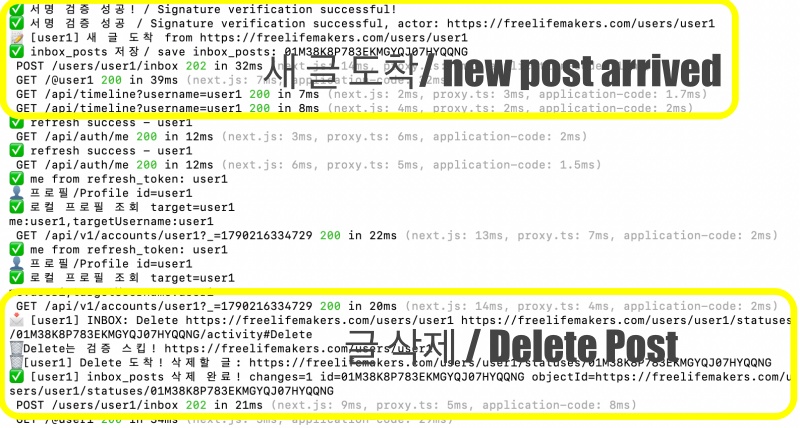
✔️ pinafore에서 글 삭제 기능 테스트는 완료했고 이미지 첨부나 설명은 생략합니다.
I have finished testing the post deletion function in Pinafore; I am omitting the image attachments and descriptions.
요한복음 8장 32절 / John 8:32
“그리고 너희는 진리를 알게 될 것이며, 진리가 너희를 자유롭게 할 것이다.”
“Then you will know the truth ,and the truth will set you free”