👉🏻 post 테이블을 생성하고 글작성을 구현합니다.
👉🏻 myapp61에서 사용했던 post테이블을 그대로 사용합니다.
📁 프로젝트 시작 / Project Start
✔️ Nextjs 프로젝트 설치
Setting up a Next.js project
npx create-next-app@latest📁 Caddy- 이미 설치 했다면 패스 / If you have already installed it, skip.💡
✔️Caddy 설치 / Caddy install
brew install caddy✔️ Caddy file 만들기 / Create a Caddyfile
# 파일열기 / Open File
nano Caddyfile

# 설정 작성 / Create Configuration
aloy-horizon.duckdns.org {
    reverse_proxy localhost:3000
}

#파일 저정후 종료 / Save file and exit (Ctrl + O,Ctrl + x)
✔️ Caddy 실행 / Run Caddy
caddy fmt --overwrite Caddyfile
caddy run

# background

caddy start
caddy stop

# 재부팅시에도 적용하려면
# To apply the setting even after rebooting

brew services start caddy
brew services stop caddy
📁 모듈 설치 / Module Installation
# db
npm install mysql2
npm install better-sqlite3

# type
npm i --save-dev @types/better-sqlite3
📁 .env.local
✔️ 데이터베이스 선택 / Select Database
DB_TYPE=sqlite                              # mysql,sqlite
DB_HOST=localhost
DB_USER=mysns
DB_PASSWORD=""
DB_DATABASE=mysns
DOMAIN=aloy-horizon.duckdns.org             # only server
NEXT_PUBLIC_DOMAIN=aloy-horizon.duckdns.org # client
JWT_SECRET=your-secret-key
📁 테이블 생성 / Create table
✔️ SQLite
sqlite> .schema posts
CREATE TABLE posts (
    id TEXT PRIMARY KEY,
    content TEXT NOT NULL,
    created_at DATETIME DEFAULT CURRENT_TIMESTAMP
  , username TEXT DEFAULT 'user1', visibility TEXT DEFAULT 'public' CHECK(visibility IN ('public','unlisted','private','direct')), original_id TEXT, sensitive INTEGER DEFAULT 0, in_reply_to_id TEXT, in_reply_to_username TEXT, in_reply_to_account_id TEXT);
CREATE INDEX idx_posts_username_created ON posts(username, created_at DESC);
CREATE INDEX idx_posts_visibility ON posts(visibility);
CREATE INDEX idx_posts_reply ON posts(in_reply_to_id);
CREATE INDEX idx_posts_reply_account ON posts(in_reply_to_account_id);
sqlite>
✔️ Mysql
CREATE TABLE `posts` (
  `id` varchar(255) NOT NULL,
  `content` text NOT NULL,
  `created_at` bigint DEFAULT NULL,
  `username` varchar(255) DEFAULT 'user',
  `visibility` varchar(20) DEFAULT 'public',
  `original_id` varchar(255) DEFAULT NULL,
  `sensitive` tinyint DEFAULT '0',
  `in_reply_to_id` varchar(255) DEFAULT NULL,
  `in_reply_to_username` varchar(255) DEFAULT NULL,
  `in_reply_to_account_id` varchar(255) DEFAULT NULL,
  PRIMARY KEY (`id`),
  KEY `idx_posts_username_created` (`username`,`created_at` DESC),
  KEY `idx_posts_visibility` (`visibility`),
  KEY `idx_posts_reply` (`in_reply_to_id`),
  KEY `idx_posts_reply_account` (`in_reply_to_account_id`)
) ENGINE=InnoDB DEFAULT CHARSET=utf8mb4 COLLATE=utf8mb4_0900_ai_ci;
📁 테스트
✔️ 터미널에서 실행
curl -X POST http://localhost:3000/api/v1/statuses \
  -H "Content-Type: application/json" \
  -d '{"content":"hello my post","username":"user1","visibility":"public"}'

또는 / or

curl -X POST https://aloy-horizon.duckdns.org/api/v1/statuses \
  -H "Content-Type: application/json" \
  -d '{"content":"hello my post","username":"user1","visibility":"public"}'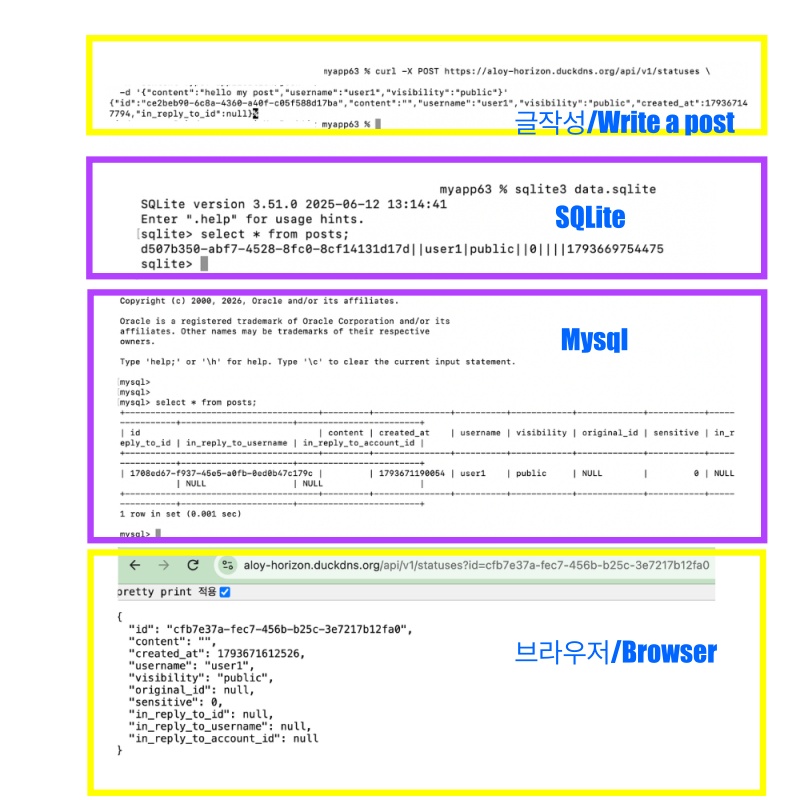
마태복음 21장 22절 / Matthew 21: 22
“너희가 기도할 때에 무엇이든지 믿고 구하는 것은 다 받으리라 하시니라”
“And everything you ask in prayer, believing, you will receive.”