👉🏻 myapp45에서는 Tursky로그인 부분을 구현합니다.
In myapp45, the Tursky login functionality is implemented.
👉🏻 웹이나 pinafore에서 정상적으로 모든데이터가 표시됩니다.
All data is displayed correctly on the web or in Pinafore.
👉🏻 하지만 Tusky앱 타임라인에 데이터가 정상적으로 표시되지 않는 문제가 있습니다.
However, there is an issue where data is not displaying correctly on the Tusky app’s timeline.
👉🏻 추후 살펴 보도록 하고 여기서는 앱에 로그인 완료하고 404오류 없애는 부분까지만 완료하겠습니다.
We will look into that later; for now, we will just complete the steps of logging into the app and resolving the 404 error.
👉🏻 전체 코드는 깃허브에서 확인 할 수 있습니다.
You can find the full code on GitHub.
https://github.com/gideonslife01/flm-nextjs
📁 전체 프로젝트 구조 / Overall Project Structure
myapp project/
├── app/  (Next.js App Router)
│   ├── .well-known/webfinger/route.ts  -> webfinger
│   ├── api/follow/route.ts    -> Follow API(temporary)
│   ├── api/announce/route.ts  -> Boost(Announcement)
│   ├── api/like/route.ts.     -> Like API
│   ├── api/posts/route.ts     -> Writing API(deprecated)
│   ├── api/timeline/route.ts  -> Timeline API
│   ├── api/followinglist/route.ts  -> followinglist API
│   ├── api/followerslist/route.ts  -> followerslist API
│   ├── api/v1/instance/route.ts -> auth
│   ├── api/v1/apps/route.ts.    -> auth
│   ├── api/v1/accounts/verify_credentials/route.ts -> auth
│   ├── api/v1/statuses/route.ts -> Write Post
│   ├── api/v1/timelines/home/route.ts -> timeline
│   ├── api/v1/media/route.ts -> Image upload
│   ├── api/v1/media/[id]/route.ts  -> Image Delete
│   ├── api/v1/instance/rules/route.ts
│   ├── api/v1/instance/domain_blocks/route.ts
│   ├── api/v1/filters/route.ts
│   ├── api/v1/lists/route.ts
│   ├── api/v1/announcements/route.ts
│   ├── api/v1/timelines/public/route.ts
│   ├── oauth/authorize/route.ts -> auth
│   ├── oauth/token/route.ts -> auth
│   ├── oauth/login-and-authorize/route.ts -> Tursky,Pinafore login processing
│   ├── oauth/revoke/route.ts
│   ├── api/v1/search/home/route.ts -> search
│   ├── api/v2/search/home/route.ts -> search
│   ├── api/v2/notifications/policy/route.ts
│   ├── api/v1/accounts/[id]/followers/route.ts -> followers
│   ├── api/v1/accounts/[id]/following/route.ts -> following
│   ├── api/v1/statuses/[id]/route.ts -> -> Post delete(pinafore)
│   ├── api/auth/signup/route.ts        -> Website Signup
│   ├── api/auth/login/route.ts         -> Website Login
│   ├── api/auth/logout/route.ts        -> Website Logout
│   ├── api/auth/refresh/route.ts       -> Refresh Token
│   ├── api/cleanup-orphan/route.ts     -> post,outbox clean up
│   ├── api/auth/me/route.tsx           -> Login Check
│   ├── auth/signup/page.tsx            -> Signup UI
│   ├── auth/signup/page.tsx            -> Login UI
│   ├── users/[username]/
│   │   ├── statuses/[id]/route.ts -> Indivisual Post
│   │   ├── route.ts               -> Acotr Information
│   │   ├── followers/route.ts     -> Followers List
│   │   ├── following/route.ts     -> Following List
│   │   ├── inbox/route.ts         -> Inbox
│   │   └── outbox/route.ts        -> outbox
│   ├── usersui/[username]/
│   │   ├── page.tsx               -> Timeline UI(Server, 404)
│   │   ├── ClientPage.tsx.        -> Timeline UI(Client,Call Active Themes)
│   │   └── _components/themes/
│   │       ├── themeex/ThemeexTheme.tsx   -> Example Theme
│   │       ├── pinafore/PinaforeTheme.tsx -> Theme 1
│   │       ├── pinafore/FollowersList.tsx -> Theme 1, FollowersList
│   │       ├── pinafore/FollowingList.tsx -> Theme 1, FollowingList
│   │       ├── pinafore/NotificationsList.tsx -> Theme 1, NotificationsList
│   │       ├── pinafore/TimelineList.tsx  -> Theme 1, TimelineList
│   │       ├── mastodon/MastodonTheme.tsx -> Theme 2
│   │       └── minimal/MinimaltTheme.tsx  -> Theme 3
│   ├── layout.tsx, page.tsx, globals.css
│   └── favicon.ico
├── lib/
│   ├── theme.tsx              -> Theme Provider
│   ├── watchThemes.ts         -> Check real-time theme changes
│   ├── auth.ts                -> Authentication, User Management
│   ├── ap.ts                  -> Follow,Undo,Create,Likes,Announce
│   ├── visibility.ts          -> Visibility(Public,Unlisted,Private,Direct)
│   └── db.ts                  -> DB connection
├── data/
│   ├── keys/userIDs/          -> private.pem, public.pem(New)
│   └── keys/                  -> private.pem, public.pem(legacy)
├── data.sqlite                -> Database(1/3)
├── data.sqlite-wal            -> Database(2/3)
├── data.sqlite-shm            -> Database(3/3)
├── Caddyfile                  -> https
├── instrumentation.ts         -> Background Server
└── package.json
📁 프로젝트 시작 / Project Start
📁 코드수정 / Code Modification
✔️ Tusky앱에 로그인 구현 / Implementing login for the Tusky app
1) app/oauth/authorize/route.ts
A. 현재 모바일앱과 웹사이트인경우 동일한 코드로 작동하지 않기 때문에 분리적용
Currently, the mobile app and the website do not operate on the same code, so they are implemented separately.
B. fetch방식이 아닌 methd=POST 방식 적용
Applied the POST method instead of the fetch method.
— 로그인 페이지로(/auth/login/page.tsx)이동하지 않고 이 라우트에서 로그인 페이지 보여주기
Display the login page on this route without navigating to the login page (/auth/login/page.tsx).
  // ✅ for CORS error
  // if (!username) {
  //     const loginUrl = new URL('/auth/login', ORIGIN); // ✅ 도메인, not loacalhost / Domain, not localhost
  //     const realNextUrl = `${ORIGIN}${url.pathname}${url.search}`; // ✅ Use the domain for Next.js, not localhost.
  //     loginUrl.searchParams.set('next', realNextUrl);
  //     return NextResponse.redirect(loginUrl.toString());
  // }

  // ✅ myapp55 수정 - 로그인 안 됐으면 /auth/login으로 이동하지 말고 여기서 로그인 폼 보여주기
  //  If not logged in, do not redirect to /auth/login, but show the login form here.
  if (!username) {
    const html = `
    <!DOCTYPE html><html><head><meta charset="utf-8"><meta name="viewport" content="width=device-width, initial-scale=1">
    <title>Login</title>
    <style>body{font-family:sans-serif;max-width:400px;margin:50px auto;padding:20px}input{width:90%;padding:10px;margin:8px 0;font-size:16px}button{width:100%;padding:12px;background:#6364ff;color:white;border:0;border-radius:8px;font-size:16px}</style>
    </head><body>
      <h2>🔐 로그인 필요(OAuth)</h2>
      <p>${clientId} 앱 승인 위해 로그인</p>
      <form method="POST" action="/oauth/login-and-authorize">
        <input type="hidden" name="client_id" value="${clientId}">
        <input type="hidden" name="redirect_uri" value="${redirectUri}">
        <input type="hidden" name="scope" value="${scope}">
        <input name="username" placeholder="username" required>
        <input name="password" type="password" placeholder="password" required>
        <button type="submit">로그인 & 승인</button>
      </form>
    </body></html>`;
    return new NextResponse(html, { headers: { 'Content-Type': 'text/html; charset=utf-8' } });
  }
✔️app/oauth/login-and-authorize/route.ts – 라우트 추가 / Add route
— Tursky앱에 로그인을 위한 라우트,로그인 처리
Route and login handling for the Tursky app
— api/auth/login/route.ts는 웹사이트용 로그인 처리
api/auth/login/route.ts handles login for the website.
... ...
export async function POST(req: Request) {
... ...
  // - Tusky는 HTML+JS로, 그 외는 302 / Tusky uses HTML+JS, others use 302
  let html: string;
  if (finalUrl.startsWith('oauth2redirect://') || finalUrl.includes('tusky')) {
    html = `<!DOCTYPE html><html><body style="text-align:center;padding:50px"><h2>✅ ${user.username} 승인됨</h2><p><a href="${finalUrl}">${finalUrl}</a></p><script>setTimeout(()=>{window.location.href="${finalUrl}"},300)</script></body></html>`;
  } else {
    html = `<!DOCTYPE html><html><body><script>window.location.href="${finalUrl}"</script><a href="${finalUrl}">${finalUrl}</a></body></html>`;
  }

  const res = new NextResponse(html, { headers: { 'Content-Type': 'text/html; charset=utf-8' } });
  res.cookies.set('token', accessToken, { httpOnly: true, secure: true, sameSite: 'lax', maxAge: 60*15, path: '/' });
  res.cookies.set('refresh_token', refreshToken, { httpOnly: true, secure: true, sameSite: 'lax', maxAge: 60*60*24*7, path: '/' });
  return res;
}
✔️ 404 오류 메세지 처리
1)app/api/v1/instance/rules/route.ts – 라우트 추가 / Add route
import { NextResponse } from 'next/server';
export async function GET() {
  return NextResponse.json([], { headers: { 'Access-Control-Allow-Origin': '*' } });
}
2)app/api/v1/instance/domain_blocks/route.ts – 라우트 추가 / Add route
app/api/v1/instance/rules/route.ts 코드와 동일
Identical to the code in app/api/v1/instance/rules/route.ts
3)app/oauth/revoke/route.ts – 라우트 추가 / Add route
A.Tusky 로그아웃 때 호출 / Add route (called upon Tusky logout)
import { NextResponse } from 'next/server';
import db from '@/lib/db';

export async function POST(req: Request) {
  try {
    const body = await req.json().catch(() => ({})) as any;
    const token = body.token;
    if (token) {
      try {
        db.prepare(`DELETE FROM oauth_tokens WHERE access_token=?`).run(token);
        db.prepare(`DELETE FROM sessions WHERE access_token=?`).run(token);
      } catch {}
    }
  } catch {}
  return NextResponse.json({});
}
export async function GET() { return NextResponse.json({}); }
4)app/api/v2/notifications/policy/route.ts – 라우트 추가 / Add route
import { NextResponse } from 'next/server';
export async function GET() {
  return NextResponse.json({ for_not_following: 'accept', for_not_followers: 'accept', for_new_accounts: 'accept', for_private_mentions: 'accept', for_limited_accounts: 'accept' });
}
5)public/icon.png – 파일추가 / add file
6) app/api/v1/filters/route.ts – 라우트 추가 / Add route
import { NextResponse } from 'next/server';
export async function GET() {
  return NextResponse.json([], { headers: { 'Access-Control-Allow-Origin': '*' } });
}
7)app/api/v1/lists/route.ts – 라우트 추가 / Add route
app/api/v1/instance/rules/route.ts 코드와 동일
Identical to the code in app/api/v1/instance/rules/route.ts
8)app/api/v1/announcements/route.ts – 라우트 추가 / Add route
app/api/v1/instance/rules/route.ts 코드와 동일
Identical to the code in app/api/v1/instance/rules/route.ts
9)app/api/v1/timelines/public/route.ts – 라우트 추가 / Add route
app/api/v1/instance/rules/route.ts 코드와 동일
Identical to the code in app/api/v1/instance/rules/route.ts
10)app/api/v1/notifications/route.ts – 코드수정 / Code Modification
A.라우트 무한 호출 멈추기 / Stop infinite route calls
B. /api/v1/notifications 무한 호출 에러 메세지
likes table rows=0 for user1
🔔 notifications return=2 follow=2 fav=0 reblog=0
 GET /api/v1/notifications?max_id=follow_1_https%3A%2F%2Ffreelifemakers.com%2Fusers%2Fuser1%2Ffollow%2F01HW187GFP316GG213ASB2DG3T&limit=30 200 in 16ms (next.js: 13ms, proxy.ts: 0.8ms, application-code: 3ms)
 GET /icon.png 404 in 25ms (next.js: 16ms, application-code: 10ms)
❤ likes table rows=0 for user1
🔔 notifications return=2 follow=2 fav=0 reblog=0
 GET /api/v1/notifications?limit=30 200 in 4ms (next.js: 0.9ms, proxy.ts: 1.0ms, application-code: 1.7ms)
❤ likes table rows=0 for user1
C. 코드 / Code
... ...
export async function GET(req: Request) {
... ...
    // ✅ myapp55 - Tusky가 max_id로 다음 페이지 달라고 하면 빈 배열 리턴 = 끝
    // Tusky가 max_id로 다음 페이지 달라고 하면 빈 배열 리턴 = 끝
    // Tursky requests the next page with max_id, return an empty array = end
    const max_id = searchParams.get('max_id');
    if (max_id) {
      return NextResponse.json([], {
        headers: { 'Access-Control-Allow-Origin': '*', 'Content-Type': 'application/json' }
      });
    }
... ...
}
... ...
11) app/api/v1/markers/route.ts – 라우트 추가 / Add route
import { NextResponse } from 'next/server';

export async function GET() {
  return NextResponse.json({
    notifications: { last_read_id: "0", version: 1, updated_at: new Date().toISOString() },
    home: { last_read_id: "0", version: 1, updated_at: new Date().toISOString() }
  }, { headers: { 'Access-Control-Allow-Origin': '*' } });
}

export async function POST(req: Request) {
  const body = await req.json().catch(()=>({}));
  return NextResponse.json(body, { headers: { 'Access-Control-Allow-Origin': '*' } });
}
12)app/api/v1/timelines/home/route.ts – 코드수정 / code modification
    // ✅ myapp55 - 계정 정보 구성 / Account information configuration
    const baseAccount = isMy
    ? {
        id: '1', username, acct: `${username}@${DOMAIN}`, display_name: username,
        avatar: `https://${DOMAIN}/icon.png`,
        avatar_static: `https://${DOMAIN}/icon.png`,
        header: `https://${DOMAIN}/header.png`,
        header_static: `https://${DOMAIN}/header.png`,
      }
    : (() => {
        let uname = 'user1', dom = 'freelifemakers.com', display = 'user1';
        if (row.actor?.includes('mastodon.social')) { uname = 'freelifemakers'; dom = 'mastodon.social'; display = 'freelifemakers'; }
        return {
          id: `remote_${dom.replace(/\./g,'_')}_${uname}`,
          username: uname, acct: `${uname}@${dom}`, display_name: display,
          avatar: `https://${DOMAIN}/icon.png`,
          avatar_static: `https://${DOMAIN}/icon.png`,
          header: `https://${DOMAIN}/header.png`,
          header_static: `https://${DOMAIN}/header.png`,
        };
      })();

    return {
      id: String(row.id),
      uri: longId,
      url: longId,
      account: baseAccount,
      content: content.startsWith('<')? content : `<p>${content}</p>`,
      created_at: new Date(parseDate(row.created_at)).toISOString(),
      visibility: 'public',
      reblogs_count,      // 전체 부스트 카운트 / Full boost count
      favourites_count,   // 전체 좋아요 카운트 / Full like count
      replies_count: 0,
      favourited: !!favourited, // 전체 좋아요 / Full like
      reblogged: !!reblogged,   // 전체 부스트 / Full Boost
      muted: false, bookmarked: false, pinned: false,
      // ✅ myapp55 - Tusky 필수 / Required for Tusky
      sensitive: false, spoiler_text: '',
      media_attachments: [],
      mentions: [],
      tags: [],
      emojis: [],
      card: null,
      poll: null,
      reblog: null,
    };
📁 테스트 / Test
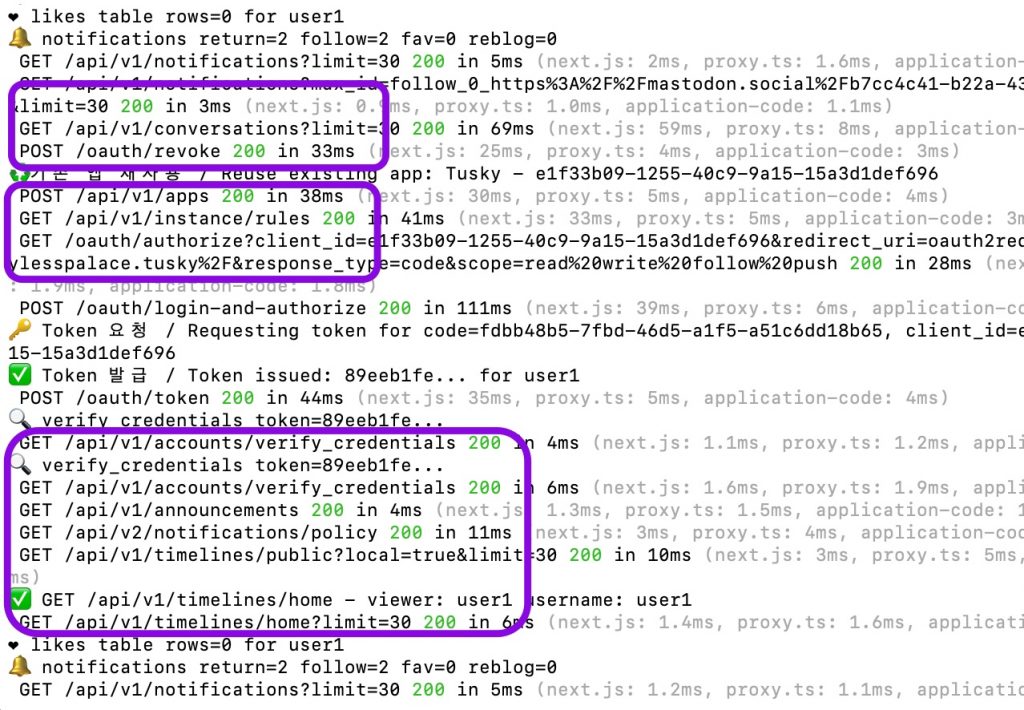
✔️ 서버로그에서 404 에러 확인 / Check for 404 errors in the server logs.
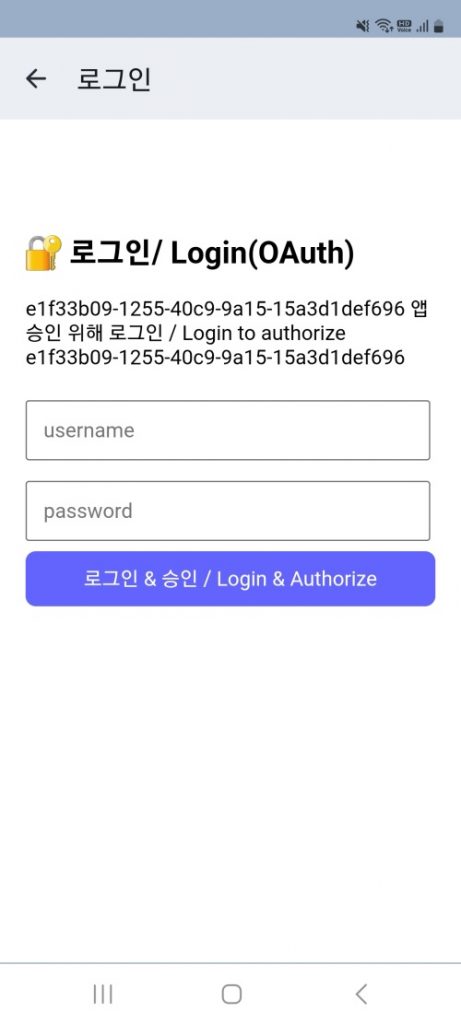
✔️ 외부 앱 로그인폼 / External App Login Form
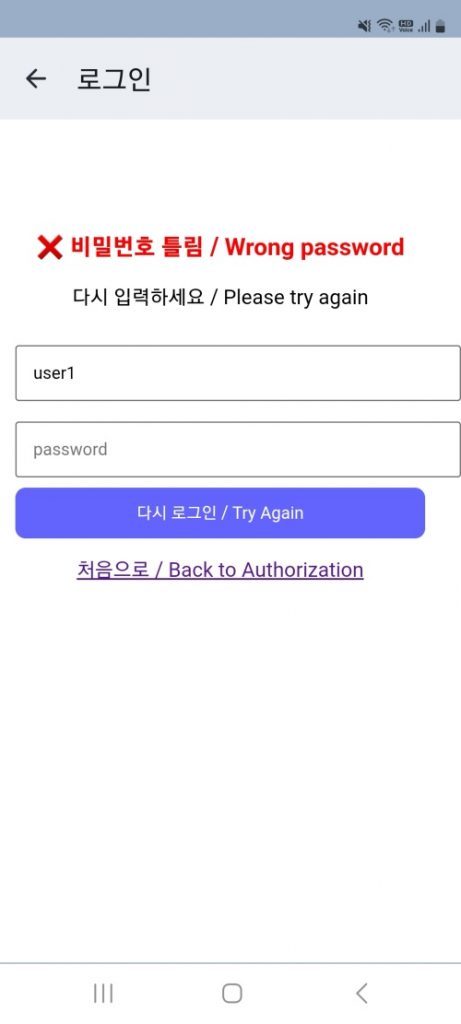
✔️ 외부 앱 로그인 폼 – 비밀번호 틀린경우 / External App Login Form – Wrong Password
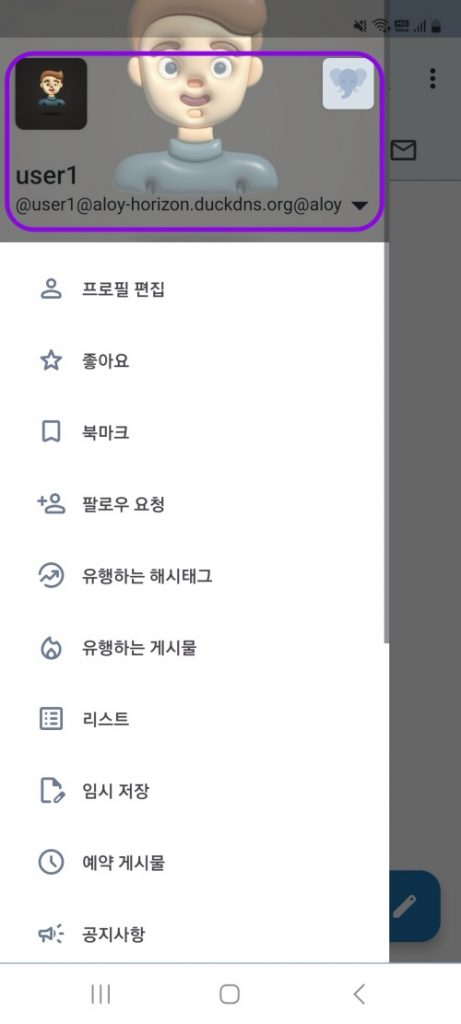
✔️ Tusky앱 로그인 및 프로필 확인 / Logging into the Tusky app and checking your profile
요한복음 8장 32절 / John 8:32
“그리고 너희는 진리를 알게 될 것이며, 진리가 너희를 자유롭게 할 것이다.”
“Then you will know the truth ,and the truth will set you free”