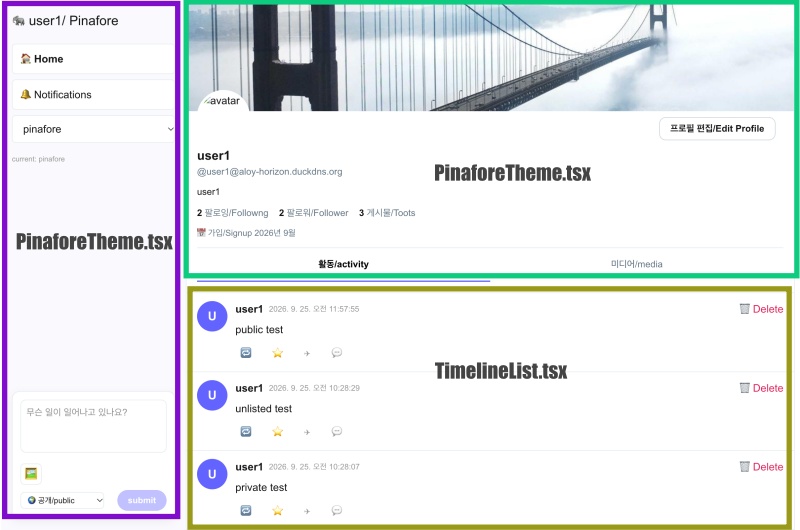
👉🏻 myapp44에서는 타임라인 부분을 다른 파일로 분리합니다.
In myapp44, the timeline section is separated into a different file.
👉🏻 전체 코드는 깃허브에서 확인 할 수 있습니다.
You can find the full code on GitHub.
https://github.com/gideonslife01/flm-nextjs
📁 전체 프로젝트 구조 / Overall Project Structure
myapp project/
├── app/  (Next.js App Router)
│   ├── .well-known/webfinger/route.ts  -> webfinger
│   ├── api/follow/route.ts    -> Follow API(temporary)
│   ├── api/announce/route.ts  -> Boost(Announcement)
│   ├── api/like/route.ts.     -> Like API
│   ├── api/posts/route.ts     -> Writing API(deprecated)
│   ├── api/timeline/route.ts  -> Timeline API
│   ├── api/followinglist/route.ts  -> followinglist API
│   ├── api/followerslist/route.ts  -> followerslist API
│   ├── api/v1/instance/route.ts -> auth
│   ├── api/v1/apps/route.ts.    -> auth
│   ├── api/v1/accounts/verify_credentials/route.ts -> auth
│   ├── api/v1/statuses/route.ts -> Write Post
│   ├── api/v1/timelines/home/route.ts -> timeline
│   ├── api/v1/media/route.ts -> Image upload
│   ├── api/v1/media/[id]/route.ts  -> Image Delete
│   ├── oauth/authorize/route.ts -> auth
│   ├── oauth/token/route.ts -> auth
│   ├── api/v1/search/home/route.ts -> search
│   ├── api/v2/search/home/route.ts -> search
│   ├── api/v1/accounts/[id]/followers/route.ts -> followers
│   ├── api/v1/accounts/[id]/following/route.ts -> following
│   ├── api/v1/statuses/[id]/route.ts -> -> Post delete(pinafore)
│   ├── api/auth/signup/route.ts        -> Signup
│   ├── api/auth/login/route.ts         -> Login
│   ├── api/auth/logout/route.ts        -> Logout
│   ├── api/auth/refresh/route.ts       -> Refresh Token
│   ├── api/cleanup-orphan/route.ts     -> post,outbox clean up
│   ├── api/auth/me/route.tsx           -> Login Check
│   ├── auth/signup/page.tsx            -> Signup UI
│   ├── auth/signup/page.tsx            -> Login UI
│   ├── users/[username]/
│   │   ├── statuses/[id]/route.ts -> Indivisual Post
│   │   ├── route.ts               -> Acotr Information
│   │   ├── followers/route.ts     -> Followers List
│   │   ├── following/route.ts     -> Following List
│   │   ├── inbox/route.ts         -> Inbox
│   │   └── outbox/route.ts        -> outbox
│   ├── usersui/[username]/
│   │   ├── page.tsx               -> Timeline UI(Server, 404)
│   │   ├── ClientPage.tsx.        -> Timeline UI(Client,Call Active Themes)
│   │   └── _components/themes/
│   │       ├── themeex/ThemeexTheme.tsx   -> Example Theme
│   │       ├── pinafore/PinaforeTheme.tsx -> Theme 1
│   │       ├── pinafore/FollowersList.tsx -> Theme 1, FollowersList
│   │       ├── pinafore/FollowingList.tsx -> Theme 1, FollowingList
│   │       ├── pinafore/NotificationsList.tsx -> Theme 1, NotificationsList
│   │       ├── pinafore/TimelineList.tsx  -> Theme 1, TimelineList
│   │       ├── mastodon/MastodonTheme.tsx -> Theme 2
│   │       └── minimal/MinimaltTheme.tsx  -> Theme 3
│   ├── layout.tsx, page.tsx, globals.css
│   └── favicon.ico
├── lib/
│   ├── theme.tsx              -> Theme Provider
│   ├── watchThemes.ts         -> Check real-time theme changes
│   ├── auth.ts                -> Authentication, User Management
│   ├── ap.ts                  -> Follow,Undo,Create,Likes,Announce
│   ├── visibility.ts          -> Visibility(Public,Unlisted,Private,Direct)
│   └── db.ts                  -> DB connection
├── data/
│   ├── keys/userIDs/          -> private.pem, public.pem(New)
│   └── keys/                  -> private.pem, public.pem(legacy)
├── data.sqlite                -> Database(1/3)
├── data.sqlite-wal            -> Database(2/3)
├── data.sqlite-shm            -> Database(3/3)
├── Caddyfile                  -> https
├── instrumentation.ts         -> Background Server
└── package.json
📁 프로젝트 시작 / Project Start
📁 코드수정 / Code Modification
✔️ 버그수정 / Bug fix
— 이전 프로젝트에서 커멘트 처리시 application/json까지 코멘트처리 된부분 코멘트 처리해제
Uncomment the part up to application/json that was commented out in the previous project
— app/usersui/[username]/_components/themes/pinafore/PinaforeTheme.tsx
const handlePost = async () => {
  ... ...
    const res = await fetch('/api/v1/statuses', {
      method: 'POST',
      // headers: {
      //   'Content-Type': 'application/json',
      //    ...(token? { Authorization: `Bearer ${token}` } : {})
      // },
      headers: {
        'Content-Type': 'application/json' // ✅ myapp54 edit: add Content-Type header for JSON
      },
      credentials: 'include',
      body: JSON.stringify({
        status: composeText,
        visibility: composeVis,
        media_ids: mediaIds // ✅ myapp51 - add media_ids
      })
    });
... ...

};
📁 테마 파일 분리 / Separating theme files
— 기존의 PinaforeTheme.tsx파일의 코드라인이 너무길어서 코드를 분리함.
Split the code because the lines in the existing PinaforeTheme.tsx file were too long.
— app/usersui/[username]/_components/themes/pinafore/PinaforeTheme.tsx
1)코드 수정 / Code Modification
          {view === 'timeline' && (
            <TimelineList
              timeline={timeline}
              currentUser={currentUser}
              onDelete={handleDelete}
              onBoost={handleBoostClick}
              onLike={handleLikeClick}
              onShare={onShare}
            />
          )}
— app/usersui/[username]/_components/themes/pinafore/TimelineList.tsx
1) 파일 생성 / Create file
A.이 부분은 기존의 타임라인에서 분리된 코드입니다.
This part is code that has been separated from the existing timeline.
// app/usersui/[username]/_components/themes/pinafore/TimelineList.tsx
// ✅ myapp54 - 타임라인 분리
'use client';

const DOMAIN = process.env.DOMAIN || 'aloy-horizon.duckdns.org';

const toAbsolute = (u: string) => {
  if (!u) return '';
  return u.startsWith('http') ? u : `https://${DOMAIN}${u}`;
};

function Avatar({ actor, username, size = 46 }: { actor: string, username: string, size?: number }) {
  const seed = actor?.startsWith('https://')
    ? (() => { try { return new URL(actor).pathname.split('/').pop() || username } catch { return username } })()
    : actor || username;
  const initial = (seed?.[0] || 'U').toUpperCase();
  return (
    <div style={{
      width: size, height: size, borderRadius: '50%',
      background: '#6364ff', color: 'white',
      display: 'flex', alignItems: 'center', justifyContent: 'center',
      fontWeight: 'bold', fontSize: size * 0.4, flexShrink: 0
    }}>{initial}</div>
  );
}

function getDisplayName(actorOrUsername: string) {
  if (!actorOrUsername) return 'unknown';
  if (actorOrUsername.startsWith('https://')) {
    try {
      const url = new URL(actorOrUsername);
      const username = url.pathname.split('/').pop() || 'user';
      return `${username}@${url.hostname}`;
    } catch { return actorOrUsername.split('/').pop() || actorOrUsername; }
  }
  return actorOrUsername;
}

type Props = {
  timeline: any[];
  currentUser: string | null;
  onDelete: (id: string) => void;
  onBoost: (p: any) => void;
  onLike: (p: any) => void;
  onShare: (p: any) => void;
};

export default function TimelineList({ timeline, currentUser, onDelete, onBoost, onLike, onShare }: Props) {
  if (timeline.length === 0) {
    return <div style={{ padding: 20, color: '#999' }}>타임라인이 비어있습니다 / No posts</div>;
  }

  return (
    <>
      {timeline.map((p: any) => (
        <article key={`${p.source}-${p.id}`} className="pinafore-status">
          <Avatar actor={p.actor} username={p.username} />
          <div className="status-content">
            <div className="status-header">
              <b>{getDisplayName(p.actor)}</b>
              <span className="status-time">{new Date(p.created_at).toLocaleString()}</span>
              {p.isBoostedPost && <span className="boost-label">🔁 {getDisplayName(p.actor)}</span>}
              {currentUser && p.isMine && (
                <button onClick={() => onDelete(p.id)} style={{ color: '#e0245e', marginLeft: 'auto' }}>
                  🗑 Delete
                </button>
              )}
            </div>
            <div className="status-text" dangerouslySetInnerHTML={{ __html: p.content }} />
            {p.media_attachments && p.media_attachments.length > 0 && (
              <div className={`status-media ${p.media_attachments.length === 1 ? 'single' : ''}`}>
                {p.media_attachments.map((m: any) => (
                  <img key={m.id} src={toAbsolute(m.preview_url || m.url)} alt="media" loading="lazy" />
                ))}
              </div>
            )}
            <div className="status-actions">
              <button onClick={() => onBoost(p)} className={p.isMyBoost ? 'boosted' : ''}>🔁 {p.boostCount || ''}</button>
              <button onClick={() => onLike(p)} className={p.isMyLike ? 'liked' : ''}>⭐ {p.likeCount || ''}</button>
              <button onClick={() => onShare(p)}>✈</button>
              <button>💬</button>
            </div>
          </div>
        </article>
      ))}
    </>
  );
}
📁 테스트 / Test
요한복음 8장 32절 / John 8:32
“그리고 너희는 진리를 알게 될 것이며, 진리가 너희를 자유롭게 할 것이다.”
“Then you will know the truth ,and the truth will set you free”