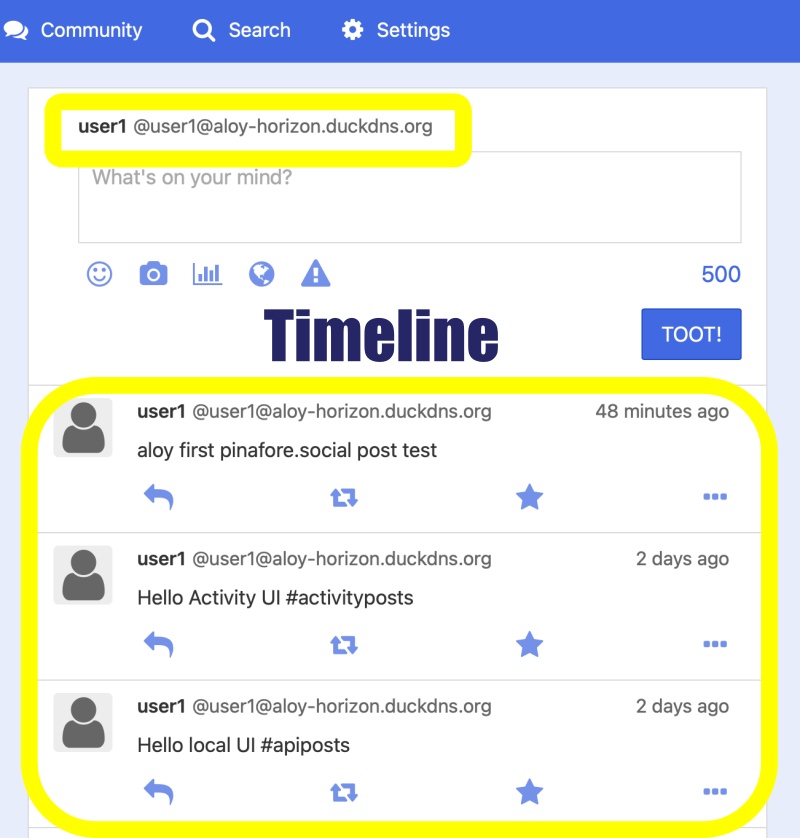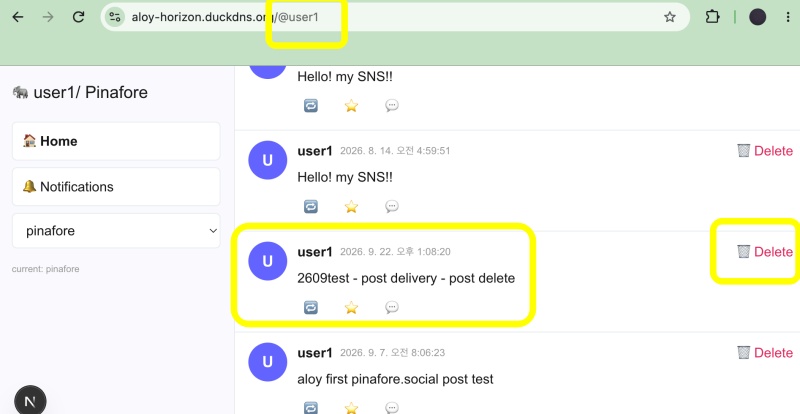
👉🏻 myapp45에서는 SNS 페이지에 글 삭제 버튼을 추가합니다.
In myapp45, a delete button for posts is added.
👉🏻 글삭제시 올바른 키로 삭제가능하도록 수정했습니다.
Modified the post deletion process to ensure deletion is possible using the correct key.
— 로그인 구현시 키 경로 변경된 부분
Changes to key paths during login implementation
👉🏻 현재 로컬은 글 저장 삭제가 되나 글배달 기능과 pinafore에서 글 삭제기능은 아직 구현중입니다.
Currently, saving and deleting posts works in the local environment, but the post delivery function and the post deletion feature in Pinafore are still under development.
— activitypub : app/api/v1/statuses/route.ts
— local : users/[username]/route.ts
👉🏻 전체 코드는 깃허브에서 확인 할 수 있습니다.
You can find the full code on GitHub.
https://github.com/gideonslife01/flm-nextjs
📁 전체 프로젝트 구조 / Overall Project Structure
myapp project/
├── app/  (Next.js App Router)
│   ├── .well-known/webfinger/route.ts  -> webfinger
│   ├── api/follow/route.ts    -> Follow API(temporary)
│   ├── api/announce/route.ts  -> Boost(Announcement)
│   ├── api/like/route.ts.     -> Like API
│   ├── api/posts/route.ts     -> Writing API
│   ├── api/timeline/route.ts  -> Timeline API
│   ├── api/followinglist/route.ts  -> followinglist API
│   ├── api/followerslist/route.ts  -> followerslist API
│   ├── api/v1/instance/route.ts -> auth
│   ├── api/v1/apps/route.ts.    -> auth
│   ├── api/v1/accounts/verify_credentials/route.ts -> auth
│   ├── api/v1/statuses/route.ts -> Write Post
│   ├── api/v1/timelines/home/route.ts -> timeline
│   ├── oauth/authorize/route.ts -> auth
│   ├── oauth/token/route.ts -> auth
│   ├── api/v1/search/home/route.ts -> search
│   ├── api/v2/search/home/route.ts -> search
│   ├── api/v1/accounts/[id]/followers/route.ts -> followers
│   ├── api/v1/accounts/[id]/following/route.ts -> following
│   ├── api/auth/signup/route.ts        -> Signup
│   ├── api/auth/login/route.ts         -> Login
│   ├── api/auth/logout/route.ts        -> Logout
│   ├── api/auth/refresh/route.ts       -> Refresh Token
│   ├── api/auth/me/route.tsx           -> Login Check
│   ├── auth/signup/page.tsx            -> Signup UI
│   ├── auth/signup/page.tsx            -> Login UI
│   ├── users/[username]/
│   │   ├── statuses/[id]/route.ts -> Indivisual Post
│   │   ├── route.ts               -> Acotr Information
│   │   ├── followers/route.ts     -> Followers List
│   │   ├── following/route.ts     -> Following List
│   │   ├── inbox/route.ts         -> Inbox
│   │   └── outbox/route.ts        -> outbox
│   ├── usersui/[username]/
│   │   ├── page.tsx               -> Timeline UI(Server, 404)
│   │   ├── ClientPage.tsx.        -> Timeline UI(Client,Call Active Themes)
│   │   └── _components/themes/
│   │       ├── themeex/ThemeexTheme.tsx   -> Example Theme
│   │       ├── pinafore/PinaforeTheme.tsx -> Theme 1
│   │       ├── pinafore/FollowersList.tsx -> Theme 1, FollowersList
│   │       ├── pinafore/FollowingList.tsx -> Theme 1, FollowingList
│   │       ├── pinafore/NotificationsList.tsx -> Theme 1, NotificationsList
│   │       ├── mastodon/MastodonTheme.tsx -> Theme 2
│   │       └── minimal/MinimaltTheme.tsx  -> Theme 3
│   ├── layout.tsx, page.tsx, globals.css
│   └── favicon.ico
├── lib/
│   ├── theme.tsx              -> Theme Provider
│   ├── watchThemes.ts         -> Check real-time theme changes
│   ├── auth.ts                -> Authentication, User Management
│   ├── ap.ts                  -> Follow,Undo,Create,Likes,Announce
│   └── db.ts                  -> DB connection
├── data/
│   ├── keys/userIDs/          -> private.pem, public.pem(New)
│   └── keys/                  -> private.pem, public.pem(legacy)
├── data.sqlite                -> Database(1/3)
├── data.sqlite-wal            -> Database(2/3)
├── data.sqlite-shm            -> Database(3/3)
├── Caddyfile                  -> https
├── instrumentation.ts         -> Background Server
└── package.json
📁 프로젝트 시작 / Project Start
📁 레거시 키를 user1으로 변경
Change the legacy key to user1.
— 연방서버에 작성된 글은 레거시키로 작성이 되어 있습니다.
Posts created on the federation server are written using legacy keys.
— 현재 user1의 키는 새로 발급된 상태입니다.
The key for user1 has currently been newly issued.
— 그래서 두키가 맞지않아 새로 발급된 키를 백업하고 레거시키로 대체 합니다.
Since the key did not match, I backed up the newly issued key and replaced it with the legacy key.
# 신규키 백업 및 레거시키를 user1 키 디렉토리로 복사
# Back up the new key and copy the legacy key to the user1 key directory.

# 백업 / backup
myapp45 % cp data/keys/user1/private.pem data/keys/user1/private.pem.bak
myapp45 % cp data/keys/user1/public.pem data/keys/user1/public.pem.bak

# 레거시키를 user1 키 디렉토리로 복사
# Copy the legacy key to the user1 key directory.
myapp45 % cp data/keys/private.pem data/keys/user1/private.pem
% cp data/keys/public.pem data/keys/user1/public.pem

# 확인 / check
myapp45 % diff data/keys/private.pem data/keys/user1/private.pem && echo "✅ same key" || echo "❌ diffrent key"
✅ same key
myapp45 %

# DB도 수정 / # DB also updated
sqlite3 db.sqlite "UPDATE users SET public_key = '$(cat data/keys/user1/public.pem)' WHERE username='user1';"
📁 코드 수정 / Code modification
💡 아래의 테마파일 수정 이전까지 단락은 내가 작성한 글에 삭제버튼을 보여주는 기능을 구현합니다.
The section below, prior to the theme file modification, implements a feature that displays a delete button on posts I have written.
✔️ API – app/api/posts/route.ts
— 라우트 수정, 모든 함수를 토큰을 적용하도록 수정
Modified routes and updated all functions to implement token-based authentication.
— inbox_posts 테이블도 내용도 삭제하도록 수정
Modified to delete both the inbox_posts table and its contents.
export async function GET(req: Request) {
  const { searchParams } = new URL(req.url);

  // ✅ myapp45 - 토큰 적용 / token apply
  let username = searchParams.get('username');
  const auth = req.headers.get('Authorization') || '';
  const token = auth.replace('Bearer ', '').trim();
  if (token) {
    const oauth = db.prepare('SELECT username FROM oauth_tokens WHERE access_token=?').get(token) as any;
    if (oauth?.username) username = oauth.username; // If you have a token username > tokenuser
  }
  if (!username) return NextResponse.json({ error: 'username required' }, { status: 401 });
... ...
}

export async function POST(req: Request) {
  let { content, username } = await req.json();

  // ✅ myapp45 - apply token
  const auth = req.headers.get('Authorization') || '';
  const token = auth.replace('Bearer ', '').trim();
  if (token) {
    const oauth = db.prepare('SELECT username FROM oauth_tokens WHERE access_token=?').get(token) as any;
    if (oauth?.username) username = oauth.username; // 토큰 있으면 토큰 유저로 덮어쓰기!
  }
  if (!username) return NextResponse.json({ error: '로그인 필요 / username required' }, { status: 400 });
  if (!content) return NextResponse.json({ error: '내용 없음 / Content required' }, { status: 400 });
...... }


export async function PUT(req: Request) {
    // ✅ myapp45 - apply token
  let { id, content, username } = await req.json();
  const auth = req.headers.get('Authorization') || '';
  const token = auth.replace('Bearer ', '').trim();
  if (token) {
    const oauth = db.prepare('SELECT username FROM oauth_tokens WHERE access_token=?').get(token) as any;
    if (oauth?.username) username = oauth.username; // 토큰 있으면 토큰 유저로 덮어쓰기!
  }
... ...
}

export async function DELETE(req: Request) {
  const { searchParams } = new URL(req.url);
  let id = searchParams.get('id'); // defalut method is GET
  let username = searchParams.get('username');

  // ✅ myapp45 - apply token
  const auth = req.headers.get('Authorization') || '';
  const token = auth.replace('Bearer ', '').trim();
  if (token) {
    const oauth = db.prepare('SELECT username FROM oauth_tokens WHERE access_token=?').get(token) as any;
    if (oauth?.username) username = oauth.username; // 토큰 있으면 토큰 유저로 덮어쓰기!
  }
... ...
  // ✅ myapp45 - inbox_posts 삭제 / Delete inbox_posts
  db.prepare('DELETE FROM inbox_posts WHERE original_id LIKE ? OR id LIKE ? OR original_id = ?').run(`%${id}%`, `%${id}%`, id);

... ...
}
✔️ API – /app/api/timeline/route.ts
— app/usersui/[username]/ClientPage.tsx에서 호출하는 API
API called by app/usersui/[username]/ClientPage.tsx
— isMine , isBoostedPost
— isBoostedPost는 재확인 예정
isBoostedPost is subject to re-verification.
... ...
  const enriched = timeline.map((p: any) => {

    // ✅ myapp45 - 다른 사랆이 부스트한 글 체크 추가 / Added a check for posts boosted by others.
    // - inbox_posts 테이블 검색인 경우 / In the case of a search on the `inbox_posts` table
    const isBoostedPost = p.source === 'inbox' && !!p.original_id && p.original_id !== p.id;

    // - posts 테이블 검색인 경우 / In the case of a search on the `posts` table
    const isMine = p.source === 'mine';
... ...
    return {
    ...p,
      fullId,
      isMyBoost,
      boostCount,
      isMyLike,
      likeCount,
      isBoostedPost, // inbox_posts 중 부스트인지 확인 / Check if the inbox_posts item is a boost.
      isMine, // 내가 쓴 글만 삭제 가능 / You can only delete posts you have written.
    };
  });
✔️ API – users/[username]/route.ts
— lib/ap.ts 함수를 사용하도록 수정
Modified to use the function in lib/ap.ts
... ...
import  { getPublicKeyPemForServing }  from '@/lib/ap';

export async function GET(_req: Request, { params }: { params: Promise<{ username: string }> }) {
  const { username } = await params;
  const domain = 'aloy-horizon.duckdns.org';
  //const pubkey = fs.readFileSync(path.join(process.cwd(), 'data/keys/public.pem'), 'utf8');
  const pubkey = getPublicKeyPemForServing(username);
... ...
}
✔️ UI – /app/usersui/[username]/_components/themes/pinafore/PinaforeTheme.tsx
— 테마파일 입니다. / This is a theme file.
... ...
// ✅ myapp45 - timeline == iniitialTimeline(like alias, not type)
export function PinaforeTheme({ timeline : initialTimeline, username, initialView, onBoost, onLike }: any) {
... ....
 // ✅ myapp45 - initialTimeline 값이 바뀌면 UI 다시 그리기
  // Redraw the UI when the initialTimeline value changes.
  const [timeline, setTimeline] = useState<any[]>(initialTimeline || []);
  useEffect(() => { setTimeline(initialTimeline || []); }, [initialTimeline]);
... ...
// ✅ myapp45: 삭제 핸들러  / Delete handler
const handleDelete = async (postId: string) => {
  if (!confirm('삭제할까? / Delete?')) return;
  try {
    // 기존 DELETE 라우트 사용 / Use the existing DELETE route.
    const res = await fetch(`/api/posts?id=${postId}&username=${currentUser}`, {
      method: 'DELETE',
      credentials: 'include'
    });
    if (res.ok) {
      setTimeline((prev: any[]) => prev.filter((t: any) => t.id !== postId));
      console.log(`🗑️ Delete ${postId} ok`);
    } else {
      alert('삭제 실패 / Deletion failed');
    }
  } catch {
    alert('삭제 실패 / Deletion failed');
  }
};
... ...
                  <div className="status-header">
                    {/* - Actor */}
                    <b>{getDisplayName(p.actor)}</b>

                    {/* - boosted- */}
                    <span className="status-time">{new Date(p.created_at).toLocaleString()}</span>
                    {p.source === 'inbox' && <span className="boost-label">🔁 boosted</span>}

                    {/* - ✅ myapp45 - Delete Posts - */}
                    {currentUser && p.isMine && (
                      <button onClick={() => handleDelete(p.id)} style={{ color: '#e0245e', marginLeft: 'auto' }}>
                        🗑 Delete
                      </button>
                    )}
                  </div>
}
💡 여기서 부터는 오류 수정을 위해서 파일 수정된 부분입니다.
The following section contains modifications made to the file to fix errors.
✔️ lib/ap.ts
— 외부에서 함수 사용가능하도록 export함수 추가
Added an export function to make the function accessible from the outside.
// ✅ myapp31 - 사용자별 공개키 가져오기 / Get user-specific public key
function getPublicKey(username: string): string {
  const userKeyPath = path.join(process.cwd(), `data/keys/${username}/public.pem`);
  const legacyKeyPath = path.join(process.cwd(), 'data/keys/public.pem');
  const directPath = path.join(process.cwd(), `data/keys/${username}.pub.pem`);

  try {
    if (fs.existsSync(userKeyPath)) {
      return fs.readFileSync(userKeyPath, 'utf8');
    }
    if (fs.existsSync(legacyKeyPath)) {
      return fs.readFileSync(legacyKeyPath, 'utf8');
    }
    if (fs.existsSync(directPath)) {
      return fs.readFileSync(directPath, 'utf8');
    }
    // DB에서 fallback! / Fallback from DB!
    const user = db.prepare('SELECT public_key FROM users WHERE username = ?').get(username) as any;
    if (user?.public_key) return user.public_key;
  } catch (e) {
    console.error(`🔑 public 키 로드 실패 / Public key load failed for ${username}:`, e);
  }
  throw new Error(`Public key not found for ${username}`);
}

// ✅ myapp45 - for mastodon
export function getPublicKeyPemForServing(username: string): string {
  return getPublicKey(username); // 파일 우선! DB fallback
}

// ✅ 공용 - 서명 + 전송 / Shared Use - Sign and send
async function signAndSend(inbox: string, doc: any, username: string) {
  const actorId = `https://${DOMAIN}/users/${username}`;
  const privateKey = getPrivateKey(username);
  const body = JSON.stringify(doc);
  const url = new URL(inbox);

  const digest = `SHA-256=${crypto.createHash('sha256').update(body).digest('base64')}`;
  const date = new Date().toUTCString();
  // ✅ myapp45 - search 포함 + 소문자 post!
  const target = `${url.pathname}${url.search}`;
  const signingString = `(request-target): post ${target}\nhost: ${url.host}\ndate: ${date}\ndigest: ${digest}`;

  const signer = crypto.createSign('sha256');
  signer.update(signingString);
  const signature = signer.sign(privateKey, 'base64');

  const keyId = `${actorId}#main-key`;
  // ✅ myapp45 - algorithm 추가 마스토돈 필수
  const sigHeader = `keyId="${keyId}",headers="(request-target) host date digest",signature="${signature}",algorithm="rsa-sha256"`;

  console.log(`🔐 SIGN ${username} -> ${inbox}\n${signingString}\n`); // 디버그용!

  const res = await fetch(inbox, {
    method: 'POST',
    headers: {
      'Content-Type': 'application/activity+json',
      'Date': date,
      'Digest': digest,
      'Signature': sigHeader,
      'Host': url.host
    },
    body
  });

  const text = await res.text();
  return { res, text, body, doc };
}
✔️ users/[username]/route.ts
— lib/ap.ts파일을 사용하도록 수정함.
Modified to use the lib/ap.ts file.
... ...
import  { getPublicKeyPemForServing }  from '@/lib/ap';
... ...
export async function GET(_req: Request, { params }: { params: Promise<{ username: string }> }) {
... ...
  //const pubkey = fs.readFileSync(path.join(process.cwd(), 'data/keys/public.pem'), 'utf8');
  const pubkey = getPublicKeyPemForServing(username);
... ...
}
📁 테스트 / Test
💡 현재 로컬서버에서 글 저장 삭제 기능은 정상적으로 작동합니다.
The functions for saving and deleting posts are currently working correctly on the local server.
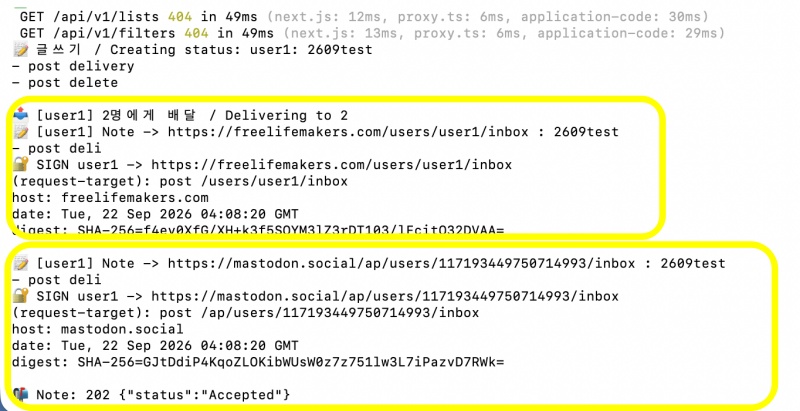
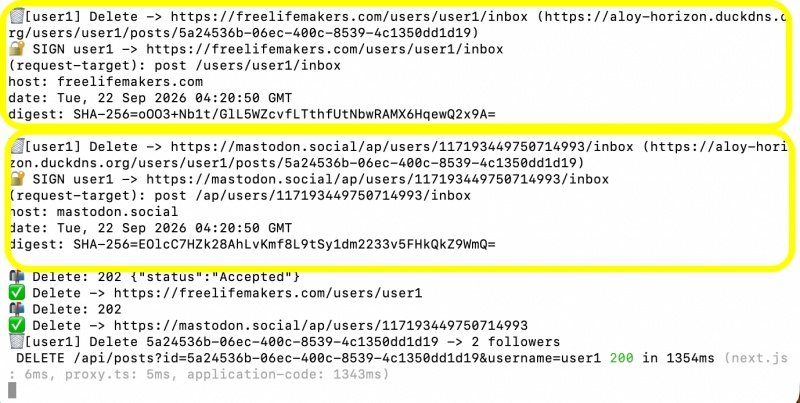
💡 아직 특정서버에 글배달이 되지 않는 문제 내 글 삭제시 배달된 연방서버의 글이 삭제 되지 않는 문제가 있습니다.
There are currently issues where posts are not being delivered to certain servers, and where posts delivered to federated servers are not deleted when the original post is removed.
✔️ 로그인 후 삭제 버튼 적용
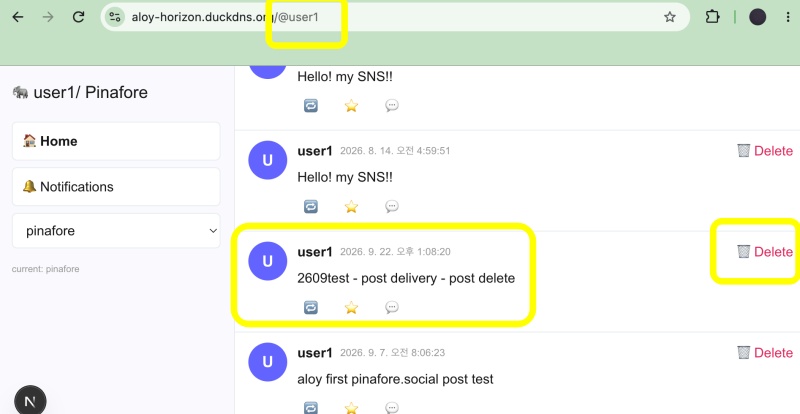
✔️ 글 배달확인 / Message Delivery Confirmation
— 현재는 gotosocial만 배달됨 / Currently, only GoToSocial is being deployed.
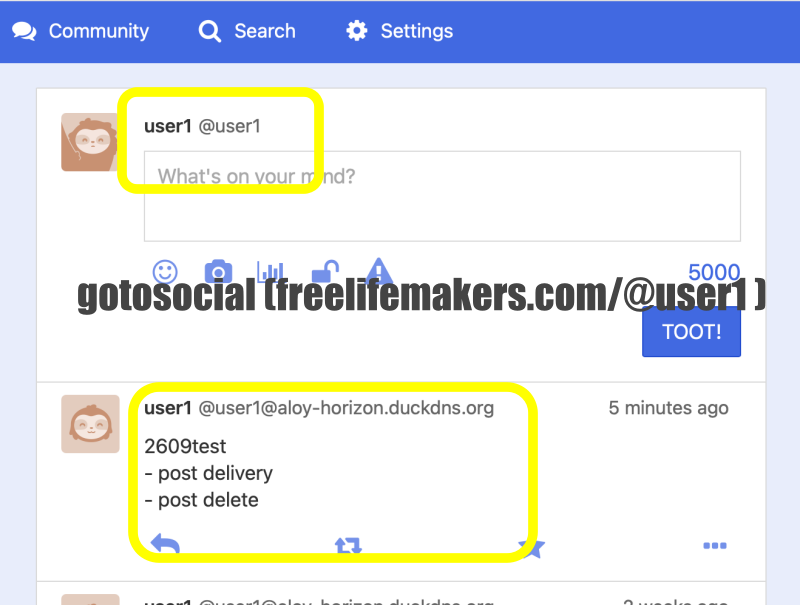
✔️ 글 삭제 / delte post
— 연방글 삭제는 현재 요청만 전달됨.
The request to delete the syndicated post has been forwarded.
요한복음 8장 32절 / John 8:32
“그리고 너희는 진리를 알게 될 것이며, 진리가 너희를 자유롭게 할 것이다.”
“Then you will know the truth ,and the truth will set you free”